Taking the Home AI Lab Hybrid, on a Leash
Summary: For most of this year my AI lab has run entirely on hardware I own: a local speech pipeline, local models on one GPU, a retrieval layer over my own notes, and a set of assistants that talk to me in the room. This month I added a small, metered slice of Azure AI Foundry to it, reached over a private tunnel, for one reason: to practice agentic development against frontier models without giving up the local-first design. Then I audited the result. This post is the trip-tik for anyone with a home lab and a cloud footprint who wants to do the same thing without the cloud becoming a dependency.
Why hybrid, and why now
Two things pushed me. The first is that agentic development is where the work is going, and I wanted hands-on practice with the frontier models and the agent tooling that live in a managed catalog. The second is that I did not want to pay for that practice with the thing I like most about the lab, which is that everything in it runs on my own hardware, on models I chose, on a network segment with no internet route.
So the design goal was loose coupling. The cloud is a capability I call in by name, for a named task, under a monthly ceiling that is tracked so I can cut it back if I need to. The economic times may be constrained; that does not mean learning should be, too. If the cloud slice went away tomorrow, the lab would not notice.
Before and after
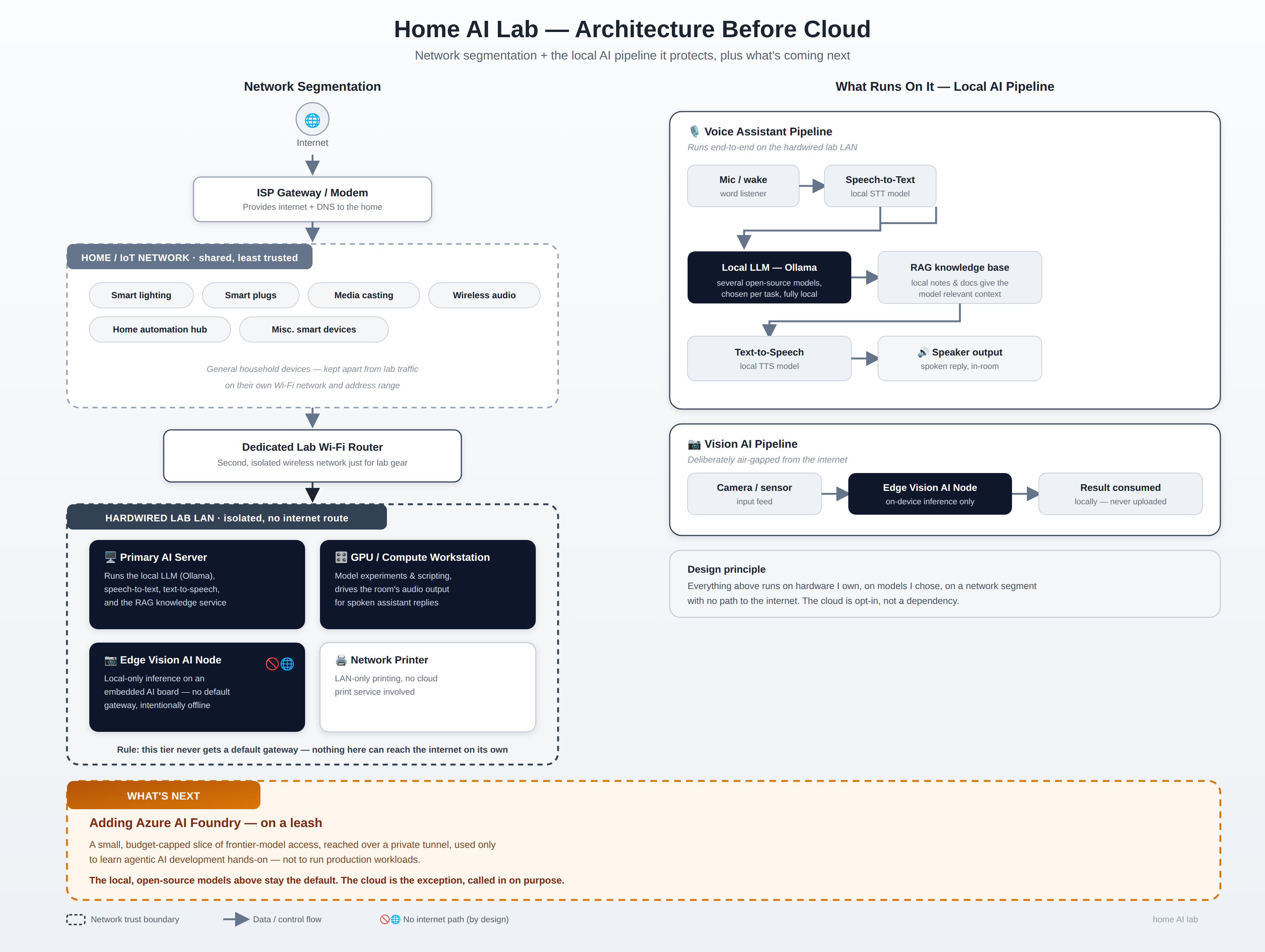
Here is the lab before any of this, with the network segmentation that the local AI pipeline sits behind. The hardwired segment on the left never gets a default gateway. Nothing on it can reach the internet on its own, and the vision node is deliberately offline.
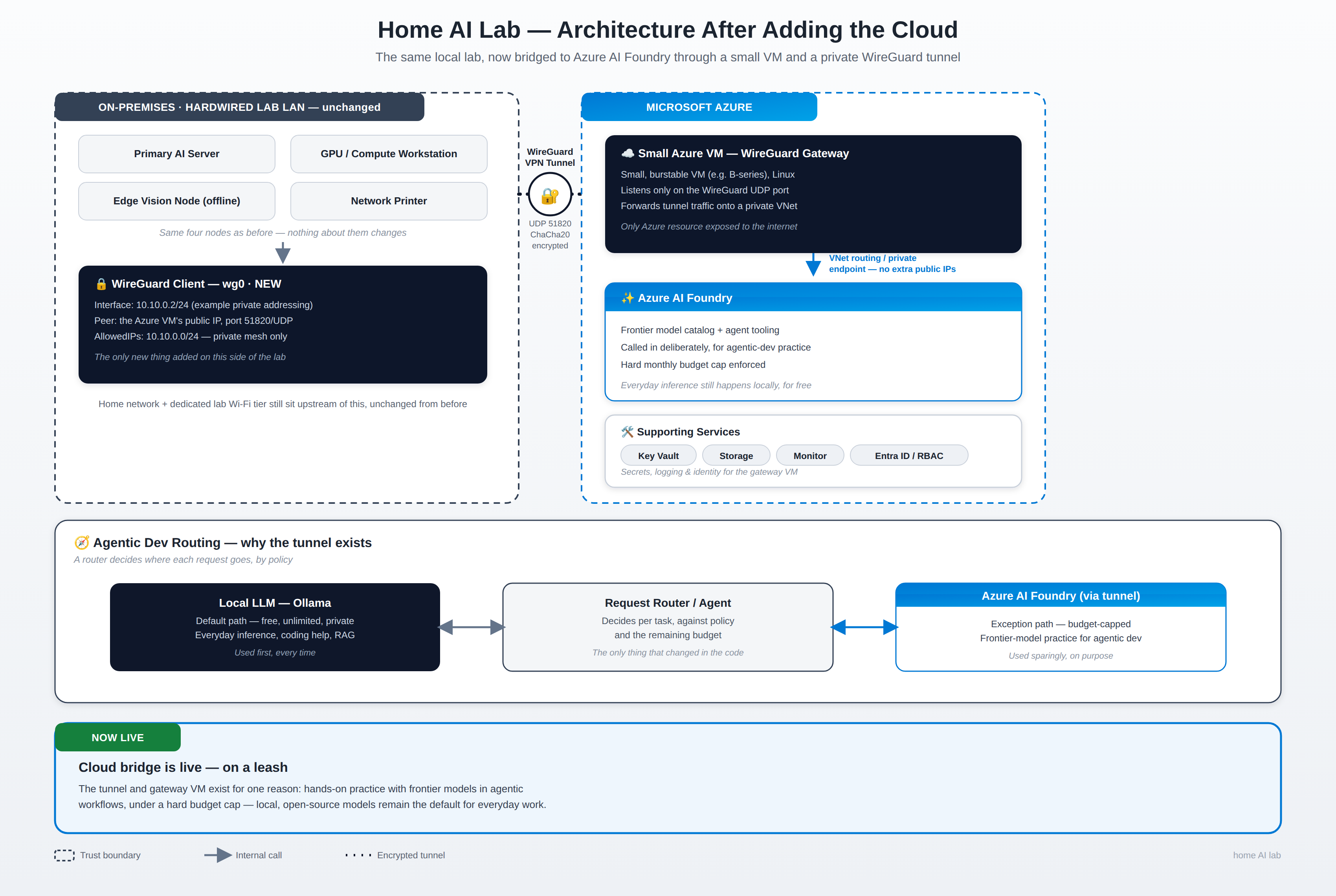
And here it is after. Notice what did not change: the four nodes on the left are the same four nodes. The only new thing on the lab side is a WireGuard client on the AI server. On the Azure side there is a small VM that terminates the tunnel, a private VNet, and the Foundry account reached through a private endpoint, so it never gets a public door.
The pivot away from the VPN gateway
My first plan was the textbook one: an Azure VPN Gateway, a site-to-site connection, done. The cheapest gateway SKU that fits the job runs somewhere around $140 a month before you have sent a single request to a model. For a lab that exists to learn on, that is the wrong order of magnitude, and it would have been the largest line on the bill by far.
What I did instead is lighter and, I think, no less secure for this scale. A small burstable Linux VM runs WireGuard and a DNS forwarder. Its network security group has exactly one inbound rule, the tunnel's UDP port. There is no SSH open to the internet; I administer the VM through the platform's run-command channel under my purpose specific sign-in. The AI server at home is a peer, and so is my desktop, which matters later. Every Azure service the lab uses (the AI account, the backup store, the key vault) has a private endpoint on that VNet and has public network access disabled outright. Name resolution for those private addresses is answered by the forwarder on the hub, so the lab host asks the tunnel, not the internet, where the AI account lives.
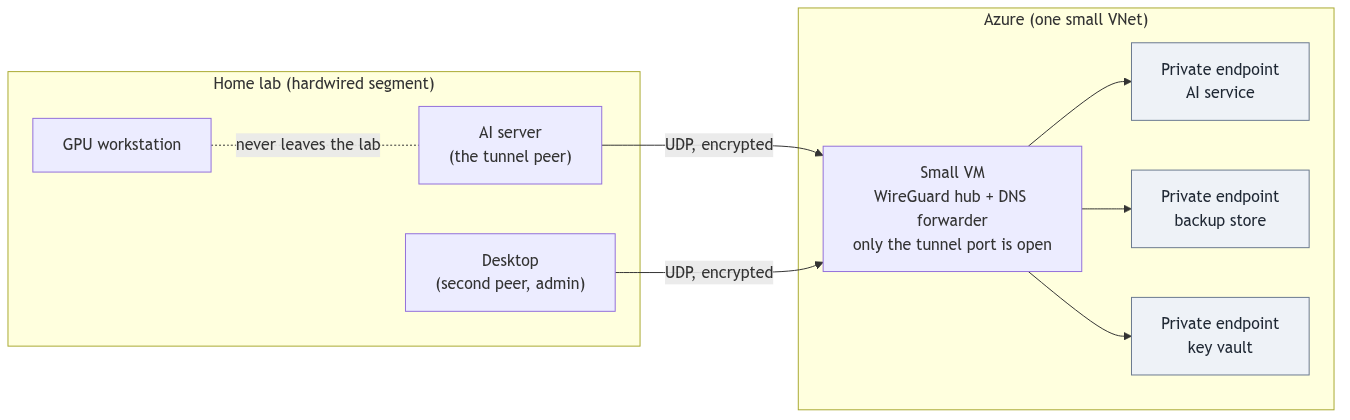
One design rule I would pass along: close the public doors last, and only after a restore path exists that does not run through the host you are protecting. My backup keys are escrowed in the key vault. If the only tunnel peer had been the AI server, then losing that server would also have lost the way to the vault that holds the keys to rebuild it. That is why the desktop is a second peer, why there is a laptop profile kept in the vault and in a password manager, and why the lock-down script refuses to close storage and the vault until it sees a second peer handshake on the hub. I rehearsed the restore over the tunnel with the doors open, then closed them, then rehearsed again.
The cost of the VM is a small fraction of the gateway, and it goes lower still once the quota for the tiniest burstable size comes through.
The decision matrix: when a request leaves the lab
The tunnel exists to serve one decision, and the decision is made in code rather than in a prompt. Every request starts local. Escalation to the frontier model is a capability rung chosen by name for a named task, never a default and never a silent fallback. I will not say which model; it does not matter to the design, and it will change. 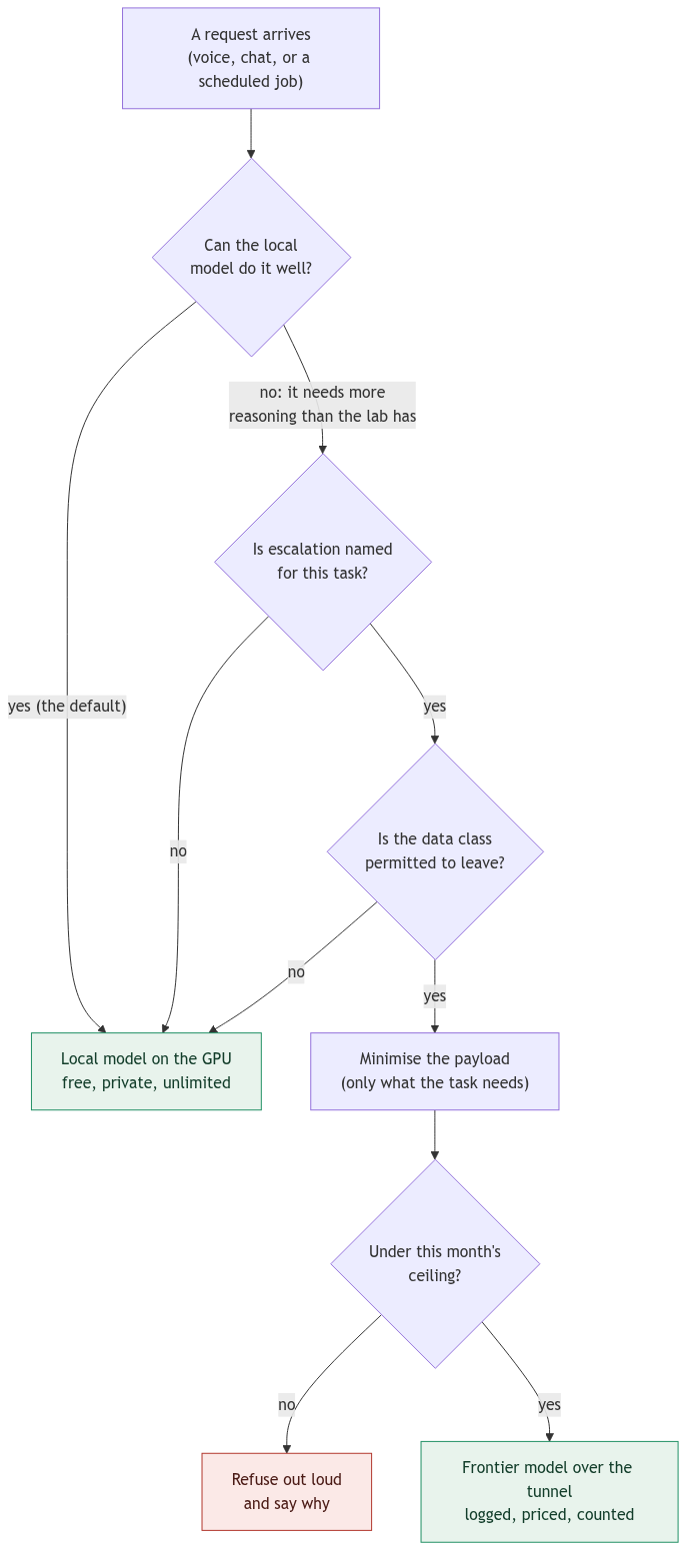
A few of the rules in that diagram deserve a sentence each.
- Escalation buys reasoning, not lab knowledge. Any fact about the lab that a cloud model needs rides along as evidence in the prompt. No design may expect the cloud to know the state of my network, my services, or my notes on its own.
- A permit per data class. Journal-derived and retrieval-derived content gets a pause before it rides an escalation, and some classes never do. The permit is a list in code with a test, not a sentence in a prompt.
- Minimization before the first byte. The payload that leaves is the smallest thing the task needs.
- The budget is a brake in the lane, not only an alert on the bill. The gateway prices every call from usage and refuses out loud when the month's ceiling is reached, and it tells the room why. The Azure budgets alert on top of that, additively, so a runaway is caught twice.
The agent framework: assistants with hands, on the lab
The other half of the year's work is the assistants. Three personas share one afferent path (the room gate, the turn kinds, the session state) and differ in what they may do. Until recently they could only speak. Now they have a small tool server of their own, and this is where I think the interesting engineering is.
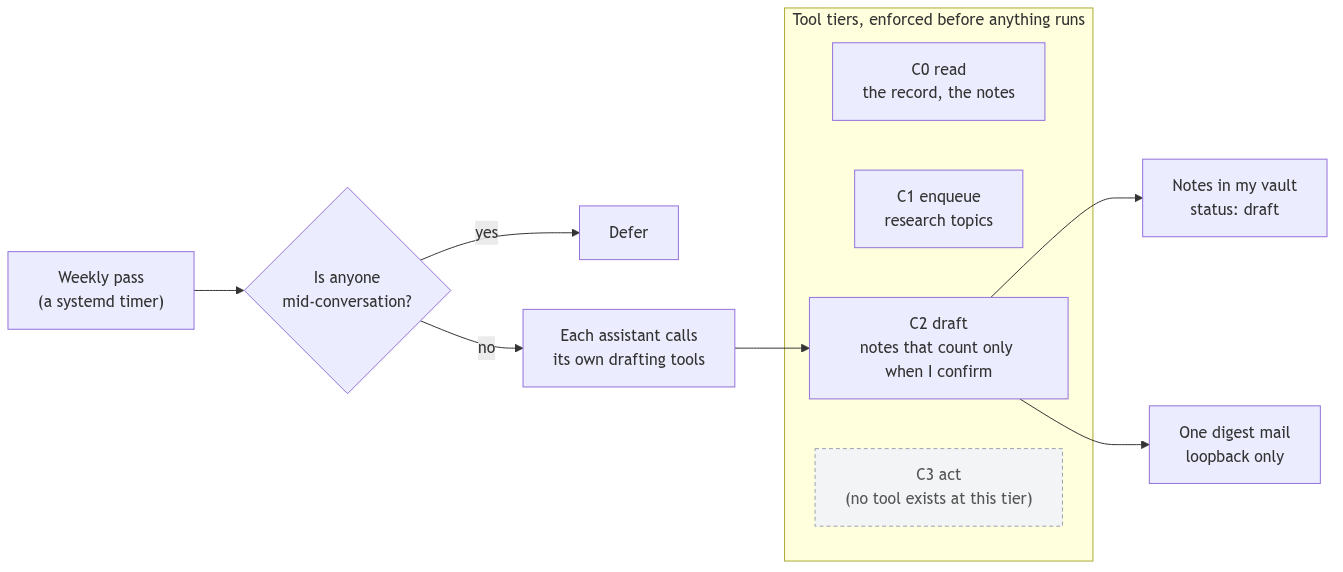
The tools follow the Model Context Protocol, and they are tiered: read, enqueue, draft, and a fourth tier for acting that has no tools in it by construction. The tiers are enforced in front of execution, not described to the model. A draft is a note in my vault marked as a draft, and it counts only when I confirm it. Once a week a systemd timer lets each assistant call its own drafting tools, yields if anyone is mid-conversation, writes nothing but drafts, never speaks, and mails me a one-line digest over a loopback-only rail. That is what "self-driven" means here: a clock and a way of telling me, not a model with root.
The lesson I keep re-learning is that a phrase in a prompt is a request and a gate in code is a guarantee. Twice this month the same defect showed up wearing different clothes: a boundary rule firing on a word inside a sentence, and a session starting on a phrase inside a sentence. Both were fixed in code. As the assistants gain tools, I expect that class of defect to show up in the tool tiers next, which is exactly why they are enforced where they are.
The security scan, and what it found
With the hybrid in place I ran the lab's own posture and port surveys and then read everything by hand: the Azure resource settings, the tunnel, the host firewalls, the log lake, the repository's controls. The short version is that prevention was sound and detection was thin.
On the prevention side: every Azure service private-only; the AI account Entra-only with local keys disabled; the store and vault with soft delete, purge protection and role-based access; a hub with one inbound rule; the lab host default-deny with subnet-scoped rules and key-only SSH; and a compromised tunnel peer unable to reach the lab host through the hub, because the host denies routed traffic and has no allow rule from the tunnel range.
On the detection side, almost nothing that would reveal an intruder was being collected. Host logins and sudo were not in the log lake. The hub sent no logs at all. The store and the vault had no audit trail. No activity-log alerts existed, so a firewall rule opened to the world would not have paged anyone. Nothing watched the tunnel's peer list. And the repository that auto-deploys to the lab host had no way to check who signed a push. That last one was not academic; earlier in the month a poisoned push had been caught by reading, not by a control.
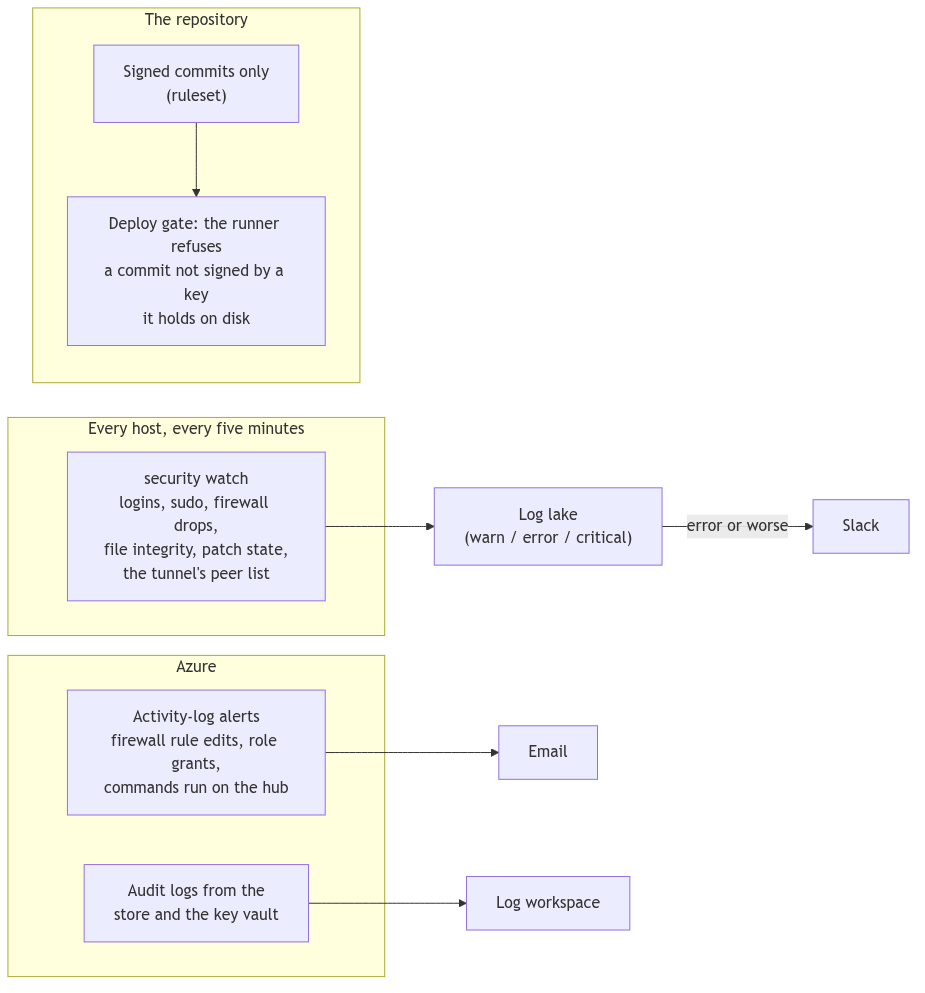
The fixes were mostly configuration on rails that already existed. A small stdlib Python watch runs on every host, including the hub, every five minutes, and posts events to the log lake: logins with first-seen addresses, every sudo, firewall drops after the segment's noise is filtered, a hash baseline of the files that grant access, patch state, and on the hub the peer list against the registry. Anything at error or above reaches Slack through a path that was already there. On the Azure side, an action group and ten activity-log alerts (free) plus audit logs from the store and the vault into the workspace the AI account already logs to. And on the repository, commits are signed with an SSH key, a ruleset requires the signature, and the deploy job verifies the commit against an allowed-signers file that lives on the runner's disk, never in the checkout, so a commit cannot admit its own key.
Two honest notes from the scan. The audit's first draft said the repository had "no branch protection", which was wrong; a ruleset already blocked force-pushes and deletion, and the legacy API I queried simply answers 404 for rulesets. And the hosts I could not read without a password turned out to matter: the GPU workstation was allowing SSH and the model server from the shared Wi-Fi segment, and my desktop had no host firewall at all. Both are on the list.
Budgets, monitoring, and the safeguards that make it loose
I am deliberately not giving my numbers here. They are low, and the point is that they are tracked rather than large. Not everyone has spare change, small or not, especially in this rough economic climate where prices have nearly doubled for family staples, and up a month to throw at this, and I do not want to depend on having it either. Two budgets sit one inside the other, the lane's own counter brakes before either alerts, and the whole cloud side is reproducible from scripts in the repository rather than from a console session, so tearing it down and standing it back up is a command.
The monitoring that matters is the boring kind: a digest mail, a Slack line on error, an email when someone runs a command on the internet-facing box (including me, on purpose, because a converge I did not run is the thing the alert exists for), and a weekly look at what the assistants wrote.
A trip-tik for the same journey
If you have a home lab and a cloud footprint and want to embrace agentic development without moving in, this is the order I would take.
- Segment first. Put the lab on a wired segment with no default gateway. Decide which single host is allowed to have a route out, and make that decision explicit.
- Pick the tunnel over the gateway at this scale. One small VM, one inbound rule, private endpoints for every service, private DNS through the hub. Keep the VM reproducible from a script.
- Make escalation a named rung. Local first, always. Cloud by name, for a named task, with a permit per data class and minimization before anything leaves.
- Put the brake in the lane. Price every call from usage and refuse out loud at the ceiling. Let the platform budgets be the second net, not the first.
- Give the assistants tools with tiers enforced in code, drafts that count only when a person confirms them, and a clock that yields to a live conversation.
- Escrow the recovery keys somewhere that does not depend on the host you are protecting, prove the restore through the tunnel, and only then close the public doors.
- Audit, then build detection, because that is where a home lab is usually thinnest: host auth and firewall events into one lake, audit logs from the cloud services, activity alerts, a watch on the tunnel's peers, and signed commits on anything that auto-deploys.
- Write down what the scan got wrong as well as what it found. The next audit starts from the corrections.
References
- WireGuard, the whitepaper and the project: https://www.wireguard.com/papers/wireguard.pdf
- Azure Private Link and private endpoints: https://learn.microsoft.com/azure/private-link/private-endpoint-overview
- Azure Cost Management budgets: https://learn.microsoft.com/azure/cost-management-billing/costs/tutorial-acm-create-budgets
- Azure VPN Gateway pricing, for the comparison: https://azure.microsoft.com/pricing/details/vpn-gateway/
- Azure Monitor activity log alerts: https://learn.microsoft.com/azure/azure-monitor/alerts/alerts-activity-log
- Model Context Protocol specification: https://modelcontextprotocol.io/specification
- Ollama, the local model runner: https://github.com/ollama/ollama
- Flux CD with SOPS and age for secrets in git: https://fluxcd.io/flux/guides/mozilla-sops/
- git SSH commit signing and allowed signers: https://git-scm.com/docs/git-config#Documentation/git-config.txt-gpgsshallowedSignersFile
- systemd timers: https://www.freedesktop.org/software/systemd/man/latest/systemd.timer.html