A Console cyberdeck for Azure and Agentic Development
Every so often, the thing you build ends up changing how you work. This may also echo the paradigm of “the obstacle becomes the way,” maybe, I don’t know that answer yet, still this was useful to me.
This path started as scattered Bash scripts. One counted tokens. Another packaged repo context for AI review. A git brief generator lived in a different folder. Another helped with ADRs. Then Azure inventory scans and security audit helpers showed up. Plus local OCR on a GPU. Then Markdown, DOCX, Mermaid, CSV, JSON, and all the other small format conversions that quietly become part of daily engineering life.
At some point it stopped feeling like a utilities folder and started feeling like a console “cyberdeck” for how I actually work in 2026. There is a Voice Assistant and an Obsidian STT/TTS service floating around the wider lab too. It has been a busy year keeping up with where all of this is going.
This goal was simple: build a local-first operator panel for agentic development, architecture, and Azure. Throw the scripts under a CUI and move the ones that had value into git.
The Cyberdeck Idea
Agentic development changes the shape of daily engineering work. Not all of it, but enough of it to notice.
You are not just drafting code anymore. You are setting up the repo so the tooling has a chance to reason inside of an existing clear design. The agents file, feature context files, and the Markdown files per feature are the feature specific definitions. Tests, architecture boundaries, feature docs, and the current deployment state all of it in measured format. This said, more context is not always better. It can mean more cost, noise, and chances for the model to chase the wrong thing. Plenty of folks have written about this before me. This is just where I have landed for now.
OCR this file. Summarize that diff. Count these tokens. Package this repo. Review the dependency shape. Create an ADR. Generate a changelog. Audit these resource groups. Convert this Markdown. Render that Mermaid diagram. Check what actually changed in Azure before assuming the diagram in your head is still accurate. In fact, one of my next goals is putting these in live checks in a deployment pipeline against the target environment versus the current architecture diagram, then generating an update or an alert when reality starts to drift.
None of those scripts are individually complex. But I am human, and I have been guilty of recreating the wheel more than once in Bash. The solution lived in the terminal, where those operations felt like options on a control board. I thought about a React UI. Then I asked myself why I would over-engineer this. Add a desktop shortcut. Launch full-window terminal. Do your job. Done.
The Mindset
The CUI hub is intentionally boring:
- Platform: My System76 Laptop (PopOS!)
- Interface: Bash scripts with a Gum-powered CUI
- UI structure: A single scripts hub with standalone tools
- AI posture: Local-first workflow support, no cloud dependency required for the tools themselves (OCR configurable)
- Primary use case: AI-assisted development with weighted architecture discipline
- Cloud focus: Azure resource group awareness, inventory, and security review helpers
From the point of view of the repository, these are the questions the hub is really trying to answer:
- What context am I giving the model?
- How large is that context?
- What changed in git?
- What decision did we make and why?
- What does this repo look like structurally?
- What changed in these Azure resource groups?
- Are there public exposure risks I should look at before moving on?
That is the cyberdeck idea: a local command center for the small, repeated tasks that support the bigger engineering judgment calls.
Architect, eat thine dogfood.
Why Not Just Use Individual Scripts?
With AI-assisted coding, I am switching between human reasoning and machine-generated output. With Azure architecture, I am switching between intended design and deployed reality. With documentation, I am leaving a trail marker for future-me instead of forcing him to reverse-engineer every decision later. Or worse, recreate the wheel on top of the earlier token spend.
My CUI cyberdeck gives those tasks a home. Run the hub. Pick the tool. Generate the artifact. Next task.
Design Principles
The principles are simple:
- Terminal-first: the shell is already where a lot of this work lives.
- Standalone by default: the launcher is convenient, but every tool still runs directly.
- Human-friendly when interactive: menus, prompts, spinners, readable output.
- Automation-safe when scripted: no UI noise bleeding into pipes, tests, or cron.
- Architecture-aware: support decisions, documentation, repo understanding, and Azure visibility.
- Small pieces loosely joined: no giant framework, no fragile platform, just useful commands.
I do not want a personal tool that becomes so precious I am afraid to change it. Something reliable, quick, fixable, and useful.
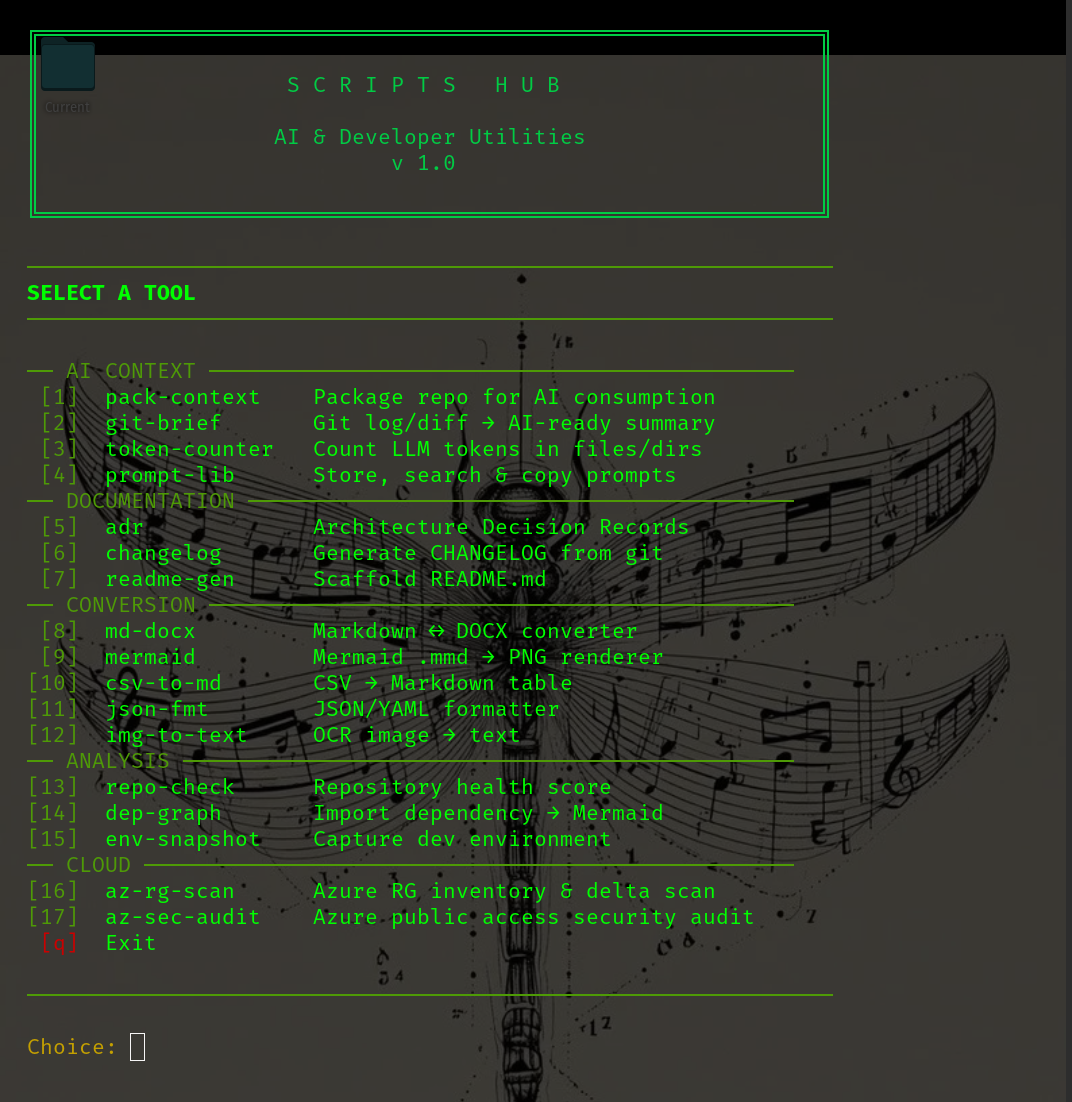
Overview of the Hub
At a high level, the cyberdeck does this:
- Launches a terminal UI through
./launch.sh - Provides standalone tools for AI context, documentation, conversion, analysis, and Azure work
- Uses Gum when available for menus, prompts, spinners, and styled output
- Falls back to plain text when running outside an interactive terminal
- Remembers useful state, like the last repository path, without silently guessing on first run
- Keeps the workflow close to the repo and close to the operator
It is a command center made out of boring parts: Bash, Python where it earns its place, Pandoc, Mermaid CLI, Azure CLI, jq, Gum, and a little homelab stubbornness. That is exactly why it is useful to me.
AI Context
The first lane is AI context. The tools are:
- pack-context
- git-brief
- token-counter
- prompt-lib
None of these are glamorous. They are the ones that make agentic development less random.
pack-context bundles a repo into an AI-ready text file with the tree, file contents, and token count.
./pack-context/pack-context.sh . -o context.txt
That turns “look at my code” into an actual input artifact. I can review it, trim it, archive it, or paste it into an AI session with a specific prompt.
git-brief gives me a structured Markdown view of git log and diff output.
./git-brief/git-brief.sh . -f both -o brief.md
Repo context answers “what is this project.” A git brief answers “what did I just change.” Those are different questions, and they deserve different inputs.
token-counter keeps me honest about context size.
./token-counter/token-count.sh ./src
Token counting sounds like bookkeeping until you blow past a context window or send the model a giant blob of irrelevant code. It forces useful questions: do I need the whole repo, do I need the tests, should generated files be excluded, and is this prompt trying to do too much at once?
prompt-lib stores personal prompts under ~/.config/scripts-hub/prompts/.
./prompt-lib/prompts.sh list
Prompts are working notes. They improve through use. If a prompt helps me review a diff, explain a codebase, generate a PR description, or challenge an architecture decision, I do not want it trapped in chat history. Prompts are part of the development environment now. Treat them that way.
Documentation Tools
The second lane is documentation. Not documentation as a corporate checkbox. Documentation as engineering memory.
The tools are:
- adr
- changelog
- readme-gen
The adr tool supports the ADR lifecycle: create from template, list by status, search, and update status.
~/src/scripts/adr/adr.sh new "Use Redis for session cache"
When coding with AI, implementation can move faster than explanation. That is useful for exploration, but it is dangerous when the decision disappears into the final code with no record of the tradeoff.
An ADR creates just enough pause:
- What did we decide?
- Why did we decide it?
- What did we consider?
- What tradeoff are we accepting?
The AI can help generate options and critique alternatives. The architecture still needs an owner.
changelog generates a CHANGELOG.md from git commits.
~/src/scripts/changelog/changelog.sh . -o CHANGELOG.md
If commits are written with reasonable discipline, a changelog should not require a heroic archaeology session. Generate it, review it, clean it up if needed, commit it.
readme-gen scaffolds a README from repository structure, detected language, scripts, and dependencies.
./readme-gen/readme-gen.sh . -o README.md
This is not about pretending generated documentation is finished documentation. It is about getting past the blank page. For AI-assisted work, a README is often the first map the model sees. The cyberdeck helps keep that map from rotting.
Converters
The third lane is conversion. Engineering work is full of little format tasks:
- Markdown needs to become DOCX.
- Mermaid diagrams need to become PNGs.
- CSV needs to become a Markdown table.
- JSON needs validation or formatting.
- YAML needs conversion.
- Screenshots and videos need OCR.
So the hub includes:
- md-docx
- mermaid
- csv-to-md
- json-fmt
- img-to-text
Purpose? Repeat tasks!
md-docx handles Markdown to DOCX conversion through Pandoc.
./markdown-converter/convert.sh --batch
Markdown is where I like to write. DOCX is where a lot of review still lives. A repeatable conversion path means I can stay in Markdown longer without making handoff painful.
The Mermaid converter renders .mmd files to PNG.
./mermaid-converter/convert-mmd-to-png.sh ./docs/diagrams
I like diagrams close to the repo. Sometimes a post, a document, or a handoff needs an image, so .mmd becomes .png.
csv-to-md and json-fmt are small, but they show up constantly in cloud and agentic workflows.
./csv-to-md/csv-to-md.sh data.csv
cat config.json | ./json-fmt/json-fmt.sh
Azure config. App settings. Tool manifests. Prompt metadata. Scan output. API responses. Bad formatting slows everything down. Invalid JSON slows it down more.
img-to-text performs OCR on images or video, with a local backend or a Jetson backend.
img-to-text screenshot.png -o ./output
This is where the cyberdeck connects back into the larger homelab. Not every workflow needs to run on the main machine. If OCR makes more sense on an edge device, route it there. If the device is not reachable, fall back. Keep the command stable and let the backend vary.
Analysis
The next lane is analysis. The tools are:
- repo-check
- dep-graph
- env-snapshot
These are not a replacement for deep static analysis, enterprise scanning, or observability. They answer a simpler question:
What am I standing in before I start moving things around?
That question matters more when AI is involved. AI-assisted coding can move quickly, but speed without situational awareness is how you get changes in the wrong layer, generated fixes that ignore project conventions, or refactors that quietly cross architecture boundaries.
repo-check gives a quick health score for a repository.
~/src/scripts/repo-check/repo-check.sh /path/to/project
It cannot understand the soul of a codebase. It can catch the obvious gaps: no README, no tests, no changelog, no ADRs, no CI.
dep-graph parses imports and generates a Mermaid dependency graph.
~/src/scripts/dep-graph/dep-graph.sh . -l python
This helps me switch from file-level thinking to system-shape thinking. What depends on what? Where are the edges? Did a helper library quietly become a dependency magnet? Does the code structure match the architecture I think I have?
env-snapshot captures OS details, runtime versions, global packages, and PATH.
~/src/scripts/env-snapshot/env-snapshot.sh -o env-before.md
This is the tool you appreciate after something breaks.
Before a larger AI-assisted change:
~/src/scripts/env-snapshot/env-snapshot.sh -o env-before.md
After the change:
~/src/scripts/env-snapshot/env-snapshot.sh -o env-after.md
Now I have something to compare. Not perfect, not enterprise-grade, but practical. Practical wins a lot of days.
Cloud Ops
The cloud lane is where the cyberdeck becomes more architecture-focused. The tools are:
- az-rg-scan
- az-sec-audit
This is the kind of thing I want near the keyboard when doing Azure architecture work, because Azure architecture is not just what is in the diagram. It is what is deployed. What changed. What is reachable. What has a public edge. What private endpoint landed in which resource group. Whether DNS still makes sense after three rounds of “quick” changes.
az-rg-scan reads a CSV of resource group names, runs against the current Azure CLI context, and writes scan output to a target directory.
printf 'ResourceGroup\nmy-rg-prod\nmy-rg-dev\n' > rgs-to-scan.csv
~/src/scripts/azure-rg-delta-scan/rg-delta-scan.sh \
  -f rgs-to-scan.csv \
  -o ./scan-output
The delta idea is the part I like most. A single scan is useful. A scan compared against a previous scan is better. What changed since the last time I looked? Did a network resource appear? Did a private endpoint move into scope? Did the resource group drift away from what the architecture notes say?
For cloud architecture, stale memory becomes a serious gap in awareness.
az-sec-audit reads a JSON config containing a resource_groups array and scans those groups for public-access exposure.
cat > config.json <<'EOF'
{
  "resource_groups": ["my-rg-prod", "my-rg-dev"]
}
EOF
~/src/scripts/azure-security-scan/audit-public-access.sh config.json
~/src/scripts/azure-security-scan/audit-public-access.sh config.json --output report.txt
This is not trying to be a complete security program. The point is to keep a fast, read-only check close to the engineering workflow. If I am already in the terminal, already thinking about architecture, already changing code or reviewing infrastructure, I want a quick way to ask whether public exposure deserves another look.
The best security checks are the ones you actually run.
Operational Details That Matter
Every tool runs independently without going through launch.sh.
./pack-context/pack-context.sh .
./token-counter/token-count.sh ./src
./git-brief/git-brief.sh . -f both -o brief.md
That keeps the tools scriptable, testable, and easy to compose.
Gum makes the terminal UI pleasant when I am driving. Plain text fallback keeps it useful when output is piped, scripted, or tested. Interactive shell: give me the cyberdeck. Automation: be quiet and useful.
The prompt-for-directory behavior is useful too, at least for now. Repo-oriented tools can prompt for a target directory when no path is supplied. First run does not silently guess. Repeat runs can remember the last path. Require intent first, then make repetition easy.
Lessons Learned
A few things this project taught me about the way I want to build developer tools for myself.
1. Agentic Development Needs Guardrails
A prompt is not a workflow. A workflow includes context packaging, token awareness, git history, repo health, dependency shape, documentation, and review loops. The AI assistant is better when the surrounding system gives it better inputs.
2. Architecture in the Headlights
ADRs, dependency graphs, Azure scans, and security audits should not live in some separate ceremony. They should be close enough to run while the work is happening.
3. Read-Only Cloud Tools Are Underrated
Inventory. Diff. Report. Review. Not every cloud helper needs to mutate resources. Sometimes the most useful tool is the one that helps you understand what is already there.
4. Small Tools Age Better
This hub is small pieces loosely joined. Bash where Bash makes sense. Python where Python helps. Existing CLIs where they already solve the problem. That makes it less precious. Less precious means I will actually improve it.
5. The Terminal Is Still a Great CUI
I don’t think there’s an argument about this, I just like it. Also, and again, I didn’t want to build a Web UI just for this - not worth it. This thing gets the job done, and then some.
- lightweight
- fast
- efficient
- retro fun
Why This Was Worth It
This cyberdeck is not about making the terminal look nice, it is about workflow control.
When I am coding in Azure-heavy systems or working through agentic development patterns, I want my local environment to help me think:
- What context am I giving the model?
- How large is it?
- What changed in git?
- What decision did we make?
- What does the dependency shape look like?
- What does the Azure resource group actually contain?
- What public exposure should I review?
- What documentation needs to be generated?
Small tools, close to the shell, wired into active work, with just enough interface polish to make the workflow enjoyable.
If you are building with AI, working in Azure, or trying to keep architecture visible while moving fast, build your own version of this. Start with understanding how you work every day. Turn the repeated tasks into a command. Then give yourself a clean way to launch (or keep track of) them.
Happy building.