Facades, Envelopes, and Orchestrators: Building a Testable Integration Chain on Azure Logic Apps
I’ve been building an integration layer between a PLM platform, an ERP system, and internal middleware using Azure Logic Apps Standard. The system needed to be testable without live endpoints, traceable end-to-end, and structured in a way that future event types could be added without rewiring plumbing.
This post documents the architecture I landed on: inbound sockets per external system, an inbound facade that stamps a standard envelope, Service Bus topic-based routing, an orchestrator with idempotency, and an outbound facade. The whole chain is toggleable between mock and live mode with a single parameter.
It’s not theoretical. It’s running. I’ll show you the patterns, the contracts, how I setup a feature toggle that decouples the in progress APIM dependency with patterns borrowed from an API project I was on for 5 years, plus… the thirty years of published engineering that backs up the architectural buzzword bingo.
The Problem
We needed to move material data from a PLM platform into an ERP system. Sounds simple until you list the requirements:
- The PLM platform pushes webhook events (or we poll, TBD at the time of build)
- The ERP system requires OAuth, specific headers, and endpoint resolution by entity type
- The orchestrator needs to validate, deduplicate, route by event type, transform, transmit, and emit downstream events
- Everything needs to be observable via Teams
- We need to test the full chain without either external system being connected yet
- The implementation team needs to understand and extend it
That last bullet matters. If the architecture isn’t legible, it won’t survive contact with the team that inherits it.
A Quick History of These Patterns
Before I walk through the implementation, I want to ground the terminology. “Facade” and “orchestrator” aren’t buzzwords, they’re published, peer-reviewed software engineering patterns with decades of production use behind them. If you’re going to use them, and defend them in architecture reviews, you should know where they come from.
The Facade Pattern: 1994–Present
The Facade pattern first appeared in Design Patterns: Elements of Reusable Object-Oriented Software by Gamma, Helm, Johnson, and Vlissides, the Gang of Four, in 1994. Their definition:
“Provide a unified interface to a set of interfaces in a subsystem. Facade defines a higher-level interface that makes the subsystem easier to use.”
The original context was object-oriented class design. You had a complex subsystem with dozens of classes, and you put a single class in front of it that exposed only what callers needed. The internal complexity didn’t go away, it just got hidden behind a clean contract.
Martin Fowler extended this to distributed systems in Patterns of Enterprise Application Architecture (2002) with the Remote Facade pattern: “Provides a coarse-grained facade on fine-grained objects to improve efficiency over a network.” His point was that when you’re crossing a network boundary, you want fewer, fatter calls instead of many chatty ones. A facade collapses the complexity of authentication, endpoint resolution, header construction, and response parsing into a single interaction.
Hohpe and Woolf took it further in Enterprise Integration Patterns (2003) with the Messaging Gateway: “A Messaging Gateway encapsulates message-specific code from the rest of the application. The application calls a simple interface without knowing about the messaging infrastructure.” This is exactly what our inbound facade does, it receives a pre-typed payload from a socket and publishes an envelope to Service Bus. The caller doesn’t know Service Bus exists. The consumer doesn’t know HTTP was involved.
Microsoft’s Azure Architecture Center (2023) describes the same idea as the Gateway Aggregation Pattern, using a gateway to aggregate and abstract multiple backend calls into a single interface. Their reference architectures for API facades in cloud integration are directly aligned with what we built.
That’s a thirty-year lineage from GoF class design → Fowler’s network boundaries → Hohpe and Woolf’s messaging systems → Microsoft’s cloud-native reference architectures. Same core principle, applied at different scales.
The Orchestrator Pattern: 2003–Present
The orchestrator concept shows up under different names depending on who’s writing:
Hohpe and Woolf (2003) call it a Process Manager: “A Process Manager routes each message to the correct processing step, maintains the state of the process, and determines the next step based on intermediate results.” Our orchestrator validates, deduplicates, routes by event type, transforms, calls the outbound facade, and emits success or failure events. That’s a process manager.
Chris Richardson in Microservices Patterns (2018) formalizes the Orchestration-based Saga: “An orchestration-based saga uses a saga orchestrator to tell the participants what to do. The saga orchestrator communicates with the participants using command/reply.” Our orchestrator sends a command (facadeRequest) to the ERP facade and processes the reply (facadeResponse). It decides the next step based on the response.
Microsoft’s Azure Architecture Center (2023) explicitly contrasts Choreography vs. Orchestration: “An orchestrator is a central coordinator that controls the interaction between services. The orchestrator is responsible for invoking the services and coordinating the workflow.” Choreography is event-driven with no central coordinator; orchestration has one. We chose orchestration because we needed deterministic routing, idempotency, and a single place to add new event types.
Sam Newman in Building Microservices, 2nd Edition (2021) ties both patterns together: “A facade can be used to present a simplified view of a legacy or complex system to the rest of your architecture… The orchestrator pattern works well when you need to coordinate behavior across multiple services and maintain a clear view of the overall business process.”
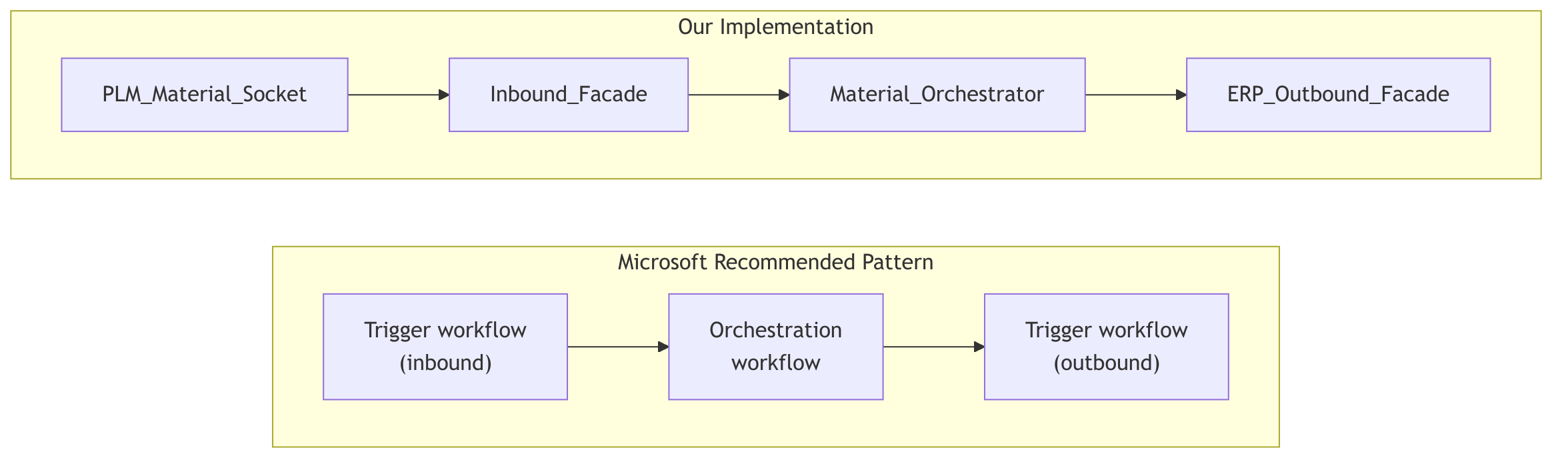
Microsoft’s own Logic Apps documentation (2024) recommends separating integration logic into trigger workflows (our sockets and facade), orchestration workflows (our orchestrator), and utility workflows for shared operations. We followed this directly.
The Pattern Lineage
| Term | Pattern Name | Source | Year |
|---|---|---|---|
| Facade | Facade Pattern | GoF , Design Patterns | 1994 |
| Facade | Remote Facade | Fowler , PoEAA | 2002 |
| Facade | Messaging Gateway | Hohpe & Woolf , EIP | 2003 |
| Facade | Gateway Aggregation | Microsoft Azure Architecture Center | 2023 |
| Orchestrator | Process Manager | Hohpe & Woolf , EIP | 2003 |
| Orchestrator | Orchestration-based Saga | Richardson , Microservices Patterns | 2018 |
| Orchestrator | Choreography vs Orchestration | Microsoft Azure Architecture Center | 2023 |
| Both | Integration separation | Microsoft Logic Apps Best Practices | 2024 |
| Both | Facade + Orchestrator | Newman , Building Microservices 2e | 2021 |
These patterns survived because they work. They decompose correctly, they separate concerns along natural boundaries, and they produce systems that teams can reason about. The specific technology doesn’t matter, Logic Apps, Azure Functions, Kubernetes, mainframe CICS, the structural principles are the same.
Now let me show you what it looks like when you build it.
The Architecture
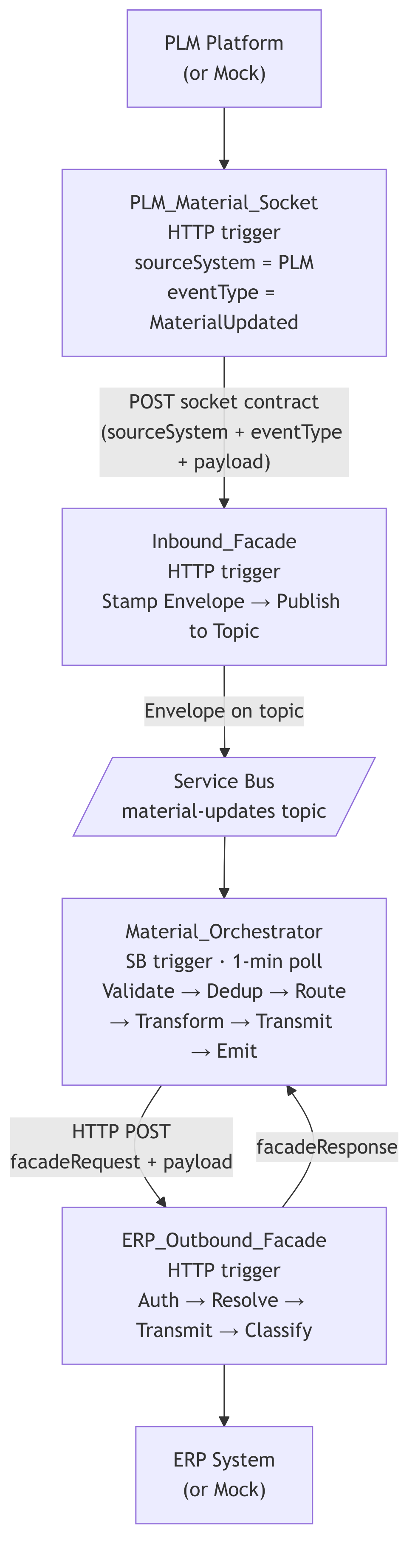
The key structural change from a typical “one big inbound workflow” approach is the socket layer. Each external system, or each event source, gets its own socket workflow. The socket is a thin, HTTP-triggered Logic App that knows exactly two things: where the request came from (sourceSystem) and what kind of event it represents (eventType). It packages those two facts alongside the raw payload and POSTs them to the single Inbound_Facade.
The facade doesn’t parse vendor-specific webhook formats. It doesn’t resolve event types from arbitrary payloads. It receives a pre-classified request from a socket, stamps the standard envelope, and drops it on the Service Bus topic. That’s it.
Borrowing the term from WebSockets: the socket is a dedicated, persistent connection point for a specific external system. The facade is the protocol layer behind it. The external system talks to its socket. The socket talks to the facade. The facade talks to the bus.
Microsoft’s recommended separation, extended with the socket layer:
Why Sockets?
The socket pattern solves three problems at once:
-
Source isolation. When a new external system needs to send material events, you add a socket workflow. You don’t modify the facade. You don’t change the envelope schema. You don’t touch the orchestrator. The blast radius of onboarding a new source is one new workflow with a known contract.
-
Event type resolution at the edge. The socket knows it handles
MaterialUpdatedevents from the PLM platform. It doesn’t inspect the payload to figure that out. It’s wired at design time. This means the facade never has to parse vendor-specific event naming conventions (material.updatedvs.MATERIAL_CHANGEvs.mat_upd). The socket translates at the boundary. -
Independent testability. Each socket can be tested in isolation. POST a payload to the PLM socket, confirm it calls the facade with the correct
sourceSystem,eventType, andpayload. The facade and everything downstream are decoupled from the test.
This is the Adapter pattern (GoF, 1994) applied at the integration boundary. Each socket adapts a specific external system’s interface into the standard internal contract that the facade expects.
The Socket Contract
Every socket POSTs to the Inbound_Facade with this structure:
{
    "sourceSystem": "PLM",
    "eventType": "MaterialUpdated",
    "entityType": "Material",
    "entityId": "MAT-90001",
    "payload": {
        "materialName": "Organic Wheat Flour",
        "supplierId": "SUP-001",
        "regulatoryStatus": "approved"
    }
}
| Field | Set by | Purpose |
|---|---|---|
sourceSystem |
Socket (hardcoded) | Identifies which external system produced this event |
eventType |
Socket (hardcoded) | The canonical event type for routing downstream |
entityType |
Socket (hardcoded or parsed) | The domain entity this event describes |
entityId |
Socket (parsed from payload) | The specific entity instance |
payload |
Socket (passed through or lightly transformed) | The business data from the external system |
The socket owns the mapping from external formats to this contract. If the PLM platform sends material.updated, the PLM socket maps that to MaterialUpdated. If a vendor system sends ITEM_CHANGE, the vendor socket maps that to MaterialUpdated (or VendorUpdated, depending on the domain event). The facade never sees the original naming convention.
Mock Mode in Sockets
Each socket has its own APIM_LIVE toggle:
Mock mode (APIM_LIVE = false): Ignores the HTTP body. Picks a payload from a MockPayloads parameter (a JSON array of test entities), sets the hardcoded sourceSystem and eventType, and POSTs to the facade.
Live mode (APIM_LIVE = true): Parses the incoming webhook body, extracts entityId from the vendor-specific field path, includes the real payload, and POSTs to the facade.
Either way, the facade receives the same contract.
The Inbound Facade
With the socket layer handling source-specific concerns, the Inbound_Facade becomes remarkably simple. It has one job: take the socket’s pre-classified request and stamp the standard envelope.
It receives the socket contract (sourceSystem, eventType, entityType, entityId, payload) and produces:
- A
messageId(new GUID) - A
correlationId(new GUID, or propagated if the socket provided one) - A
causationIdlinking back to the socket’s run ID - Tracing metadata (environment, tenant, span context)
- The full envelope wrapping the payload
Then it publishes to the appropriate Service Bus topic and returns a confirmation to the socket.
The facade doesn’t know or care which socket called it. It doesn’t inspect the payload. It doesn’t validate business rules. It stamps metadata and publishes. This is Hohpe and Woolf’s Messaging Gateway in its purest form, the caller (the socket) speaks HTTP with a known contract, and the consumer (the orchestrator) speaks envelopes on Service Bus. The facade translates between them.
The Feature Toggle
"Condition_APIM_Live": {
    "type": "If",
    "expression": {
        "and": [{ "equals": ["@parameters('APIM_LIVE')", true] }]
    }
}
One boolean. One branch. The facade uses this to decide whether to actually publish to Service Bus or return a mock confirmation. In practice, mock mode is more useful at the socket level (generating fake payloads), but the facade toggle lets you test envelope stamping without a live Service Bus connection.
The Message Envelope
Every message on the Service Bus conforms to this structure:
{
    "schemaVersion": "1.0",
    "messageId": "guid",
    "correlationId": "guid",
    "causationId": "SOCKET-PLM-{socketRunId}",
    "sourceSystem": "PLM",
    "eventType": "MaterialUpdated",
    "commandType": null,
    "entityType": "Material",
    "entityId": "MAT-90001",
    "occurredAt": "2026-03-11T16:00:00Z",
    "replayFlag": false,
    "trace": {
        "traceId": "guid",
        "spanId": "inbound-facade",
        "env": "dev",
        "tenant": "integration-platform"
    },
    "payload": {
        "materialName": "Organic Wheat Flour",
        "supplierId": "SUP-001",
        "regulatoryStatus": "approved"
    }
}
Why This Shape
| Field | Purpose |
|---|---|
schemaVersion |
Forward compatibility. The orchestrator validates this. |
messageId |
Unique per message. Used as the idempotency key. |
correlationId |
Ties the entire chain together across all workflows. |
causationId |
What caused this message. Links back to the socket run. Enables event sourcing traceability. |
sourceSystem |
Which external system originated this event. Set by the socket. |
eventType |
Routing key. The orchestrator’s Switch action uses this. Set by the socket. |
entityType + entityId |
What this message is about. Partition key for idempotency. |
trace |
Distributed tracing metadata. Environment, tenant, span context. |
payload |
The actual business data. Schema varies by entity type. Passed through from the socket. |
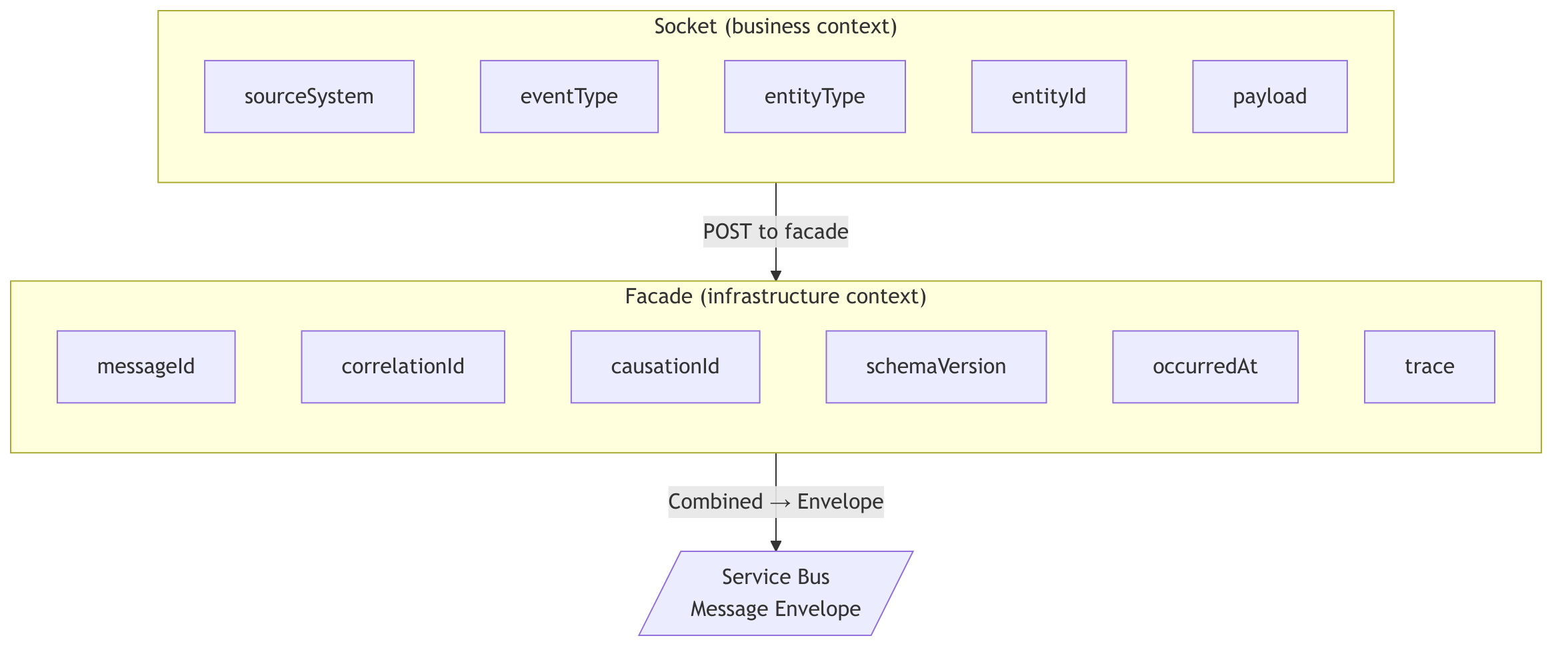
This is derived from the Process Manager pattern (Hohpe & Woolf, p. 312) and Microsoft’s own event schema guidance for Azure Integration Services. Every field has a job. The socket sets the business context (sourceSystem, eventType, entityType, entityId, payload). The facade sets the infrastructure context (messageId, correlationId, causationId, trace, schemaVersion, occurredAt).
The following diagram shows which layer owns which envelope fields:
The Orchestrator
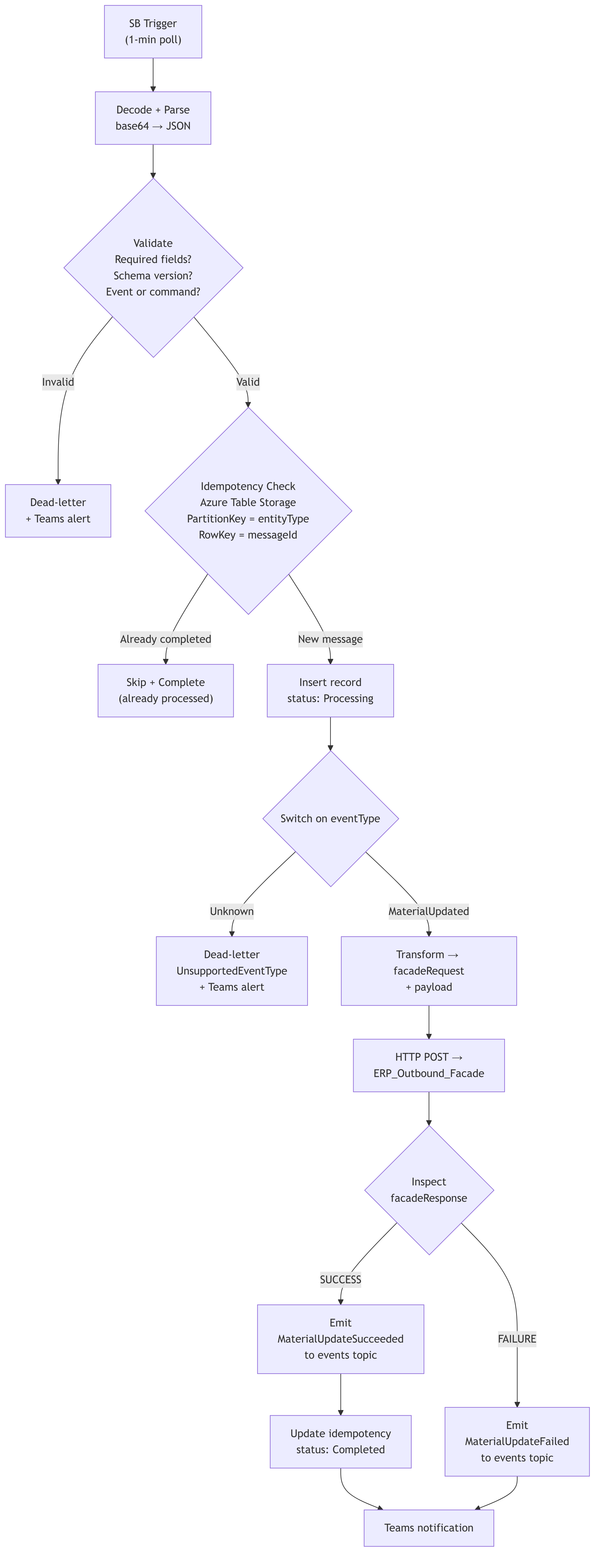
The Material_Orchestrator is triggered by the Service Bus subscription. It polls every minute. When a message arrives, it executes Hohpe and Woolf’s Process Manager: route the message to the correct processing step, maintain state, and determine the next step based on intermediate results.
1. Decode and Parse
"Compose_Envelope": {
    "inputs": "@base64ToString(triggerBody()?['ContentData'])"
}
Service Bus messages are base64-encoded. We decode, then parse against the envelope schema.
2. Validate
Three sequential validation checks:
- Required fields: schemaVersion, messageId, correlationId, sourceSystem, entityType, entityId, occurredAt, payload
- Schema version: Must be
1.0 - Event or command type: Exactly one of
eventTypeorcommandTypemust be present
Validation errors accumulate into an array. If any check fails, the message is dead-lettered with the specific errors joined into the dead-letter description. A Teams card fires with the full error context. The run terminates with Succeeded status, because handling an invalid message gracefully is correct behavior, not a failure.
3. Idempotency Check
"Get_Idempotency_Record": {
    "type": "ApiConnection",
    "inputs": {
        "path": "/v2/storageAccounts/.../tables/idempotency/entities(
            PartitionKey='Material',
            RowKey='{messageId}'
        )"
    }
}
We use Azure Table Storage. Partition key = entity type. Row key = message ID.
The logic:
- Record exists with
status: Completed→ skip processing, complete the message, terminate - Record doesn’t exist (404) → insert with
status: Processing, continue - After successful processing → update to
status: Completedwith timestamp
This handles Service Bus’s at-least-once delivery guarantee. The same message can arrive twice. The orchestrator processes it once. This is Richardson’s saga pattern applied at the message level, each processing step is tracked, and replays are caught before they cause duplicate side effects.
4. Route by Event Type
"Switch_DetermineBusinessAction": {
    "expression": "@variables('_eventType')",
    "cases": {
        "Case_MaterialUpdated": { "case": "MaterialUpdated", ... }
    },
    "default": { ... dead-letter as UnsupportedEventType ... }
}
Adding a new event type means adding a new case to the switch. Each case follows the same internal pattern: Transform → Transmit → Emit Event → Notify.
The default case dead-letters and sends a Teams alert. Unknown event types don’t fail silently. This is a deliberate design choice, I’d rather get an alert about an event type I didn’t expect than have it sit on the subscription forever or get silently consumed.
Because the socket layer resolves event types at the edge, the orchestrator’s switch cases are always clean canonical names (MaterialUpdated, VendorUpdated, FormulaUpdated). No vendor-specific naming leaks this far into the chain.
5. Transform and Transmit
For MaterialUpdated, the orchestrator transforms the envelope into the outbound facade’s contract:
{
    "facadeRequest": {
        "correlationId": "...",
        "messageId": "...",
        "runId": "...",
        "sourceSystem": "PLM",
        "targetSystem": "ERP",
        "direction": "OUTBOUND",
        "entityType": "Material",
        "entityId": "...",
        "eventType": "MaterialUpdated",
        "operation": "UPSERT",
        "timestamp": "..."
    },
    "payload": {
        "materialName": "...",
        "supplierId": "...",
        "regulatoryStatus": "..."
    }
}
This is Richardson’s command/reply in action. The orchestrator sends a command (facadeRequest) and the facade returns a reply (facadeResponse). The orchestrator decides the next step based on the reply.
6. Emit Downstream Event
After a successful ERP call, the orchestrator publishes a MaterialUpdateSucceeded event to the events topic:
{
    "schemaVersion": "1.0",
    "eventType": "MaterialUpdateSucceeded",
    "causationId": "{original messageId}",
    "payload": {
        "targetSystem": "ERP",
        "status": "SUCCESS",
        "erpHttpStatus": "200"
    }
}
Same envelope format. Same tracing. Same correlation ID. Any downstream subscriber on the events topic can react to this without knowing anything about the orchestrator’s internals.
The Outbound Facade
The ERP_Outbound_Facade is Fowler’s Remote Facade applied to a cloud integration boundary. The ERP system’s API surface requires OAuth token acquisition, endpoint resolution by entity type, specific headers, exponential retry, and error classification across auth failures, validation errors, and server errors. The facade collapses all of that into a single HTTP POST with a standard contract.
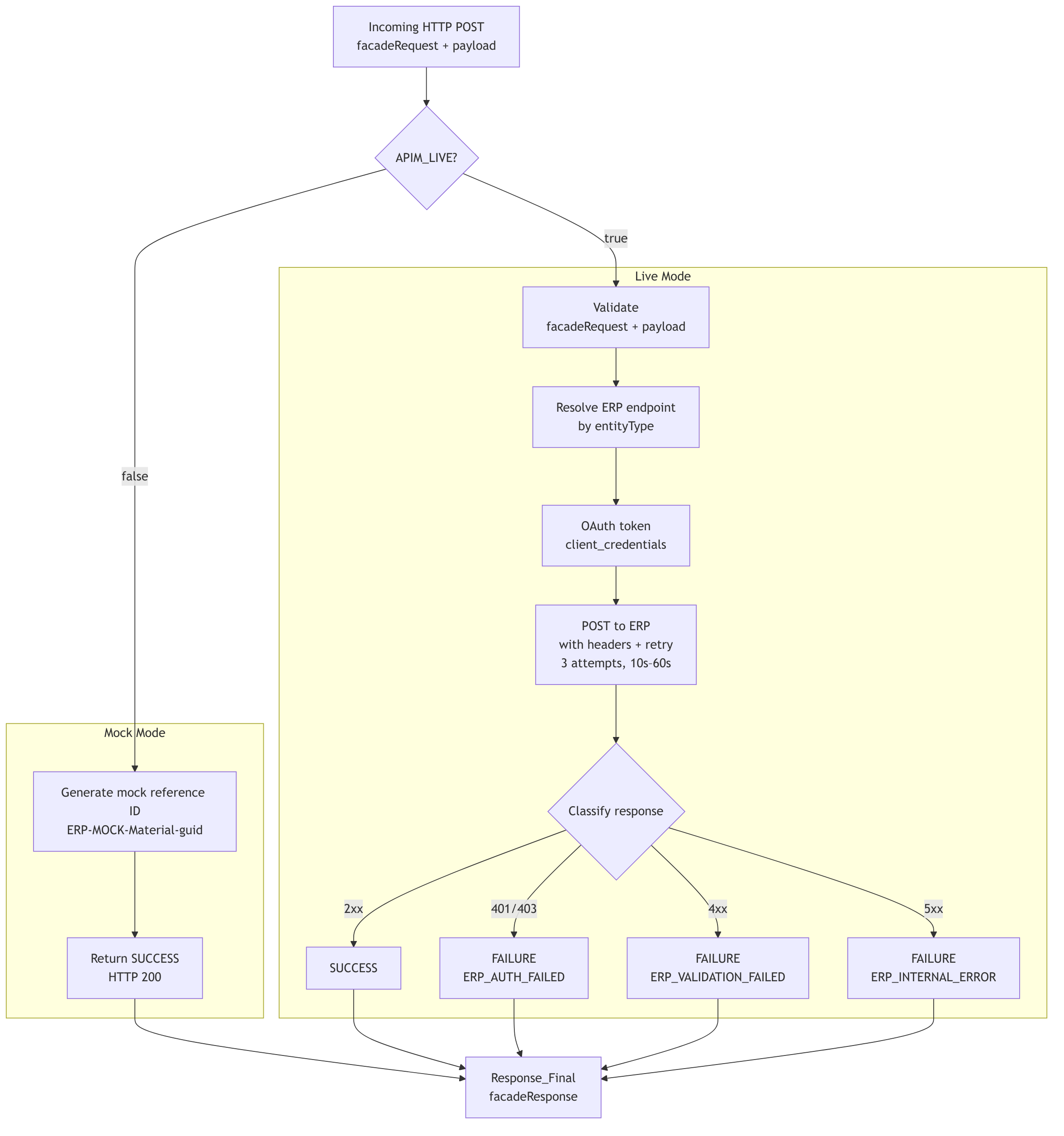
Mock mode (APIM_LIVE = false): Skips auth and the ERP call entirely. Generates a mock external reference ID (ERP-MOCK-Material-{guid}), returns SUCCESS with HTTP 200.
Live mode (APIM_LIVE = true):
- Validates the
facadeRequest+payloadstructure - Resolves the ERP endpoint by entity type (Material →
/api/material/v1/materials) - Authenticates via OAuth (
client_credentials) - Posts the transformed payload with required headers and exponential retry (3 attempts, 10s–60s intervals)
- Classifies the response:
| ERP HTTP Status | Facade Status | Error Code |
|---|---|---|
| 2xx | SUCCESS | , |
| 401, 403 | FAILURE | ERP_AUTH_FAILED |
| 4xx (other) | FAILURE | ERP_VALIDATION_FAILED |
| 5xx | FAILURE | ERP_INTERNAL_ERROR |
The response contract is always the same:
{
    "facadeResponse": {
        "status": "SUCCESS | REJECTED | FAILURE | ERROR",
        "correlationId": "...",
        "targetHttpStatus": 200,
        "externalReferenceId": "ERP-MOCK-Material-...",
        "errorCode": "",
        "errorMessage": "",
        "mode": "MOCK | LIVE"
    }
}
The orchestrator inspects status and targetHttpStatus. It doesn’t need to know whether the ERP was real or mocked. That’s the facade contract doing its job.
Error Handling: Try / Catch / Finally
All workflows, sockets, facade, orchestrator, outbound facade, use the same structural pattern:
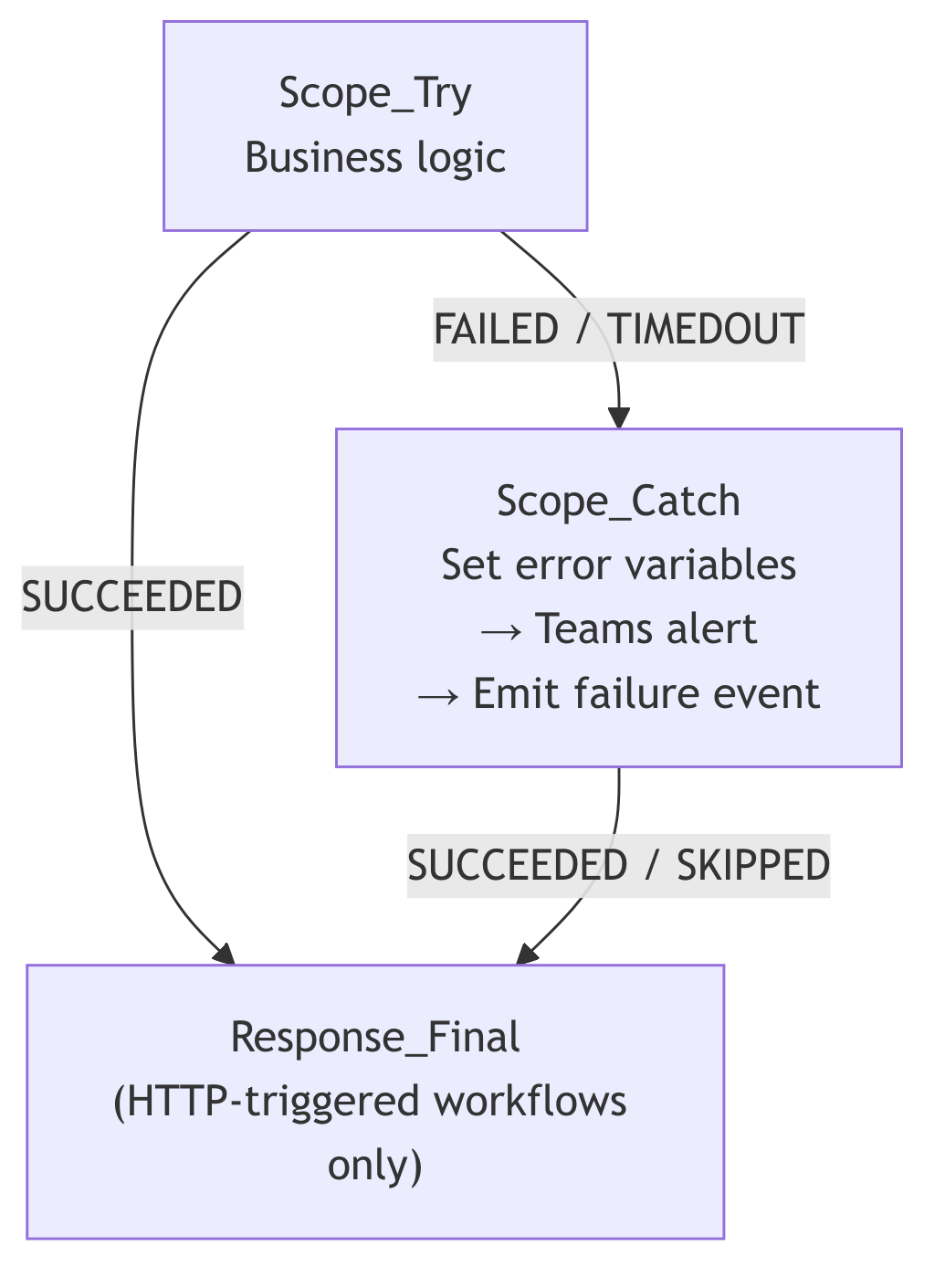
Response_Final runs on every code path. The HTTP caller always gets a response. No timeouts. No abandoned requests.
The orchestrator’s Scope_Exception_Handler emits a MaterialUpdateFailed event to the events topic before alerting Teams. Downstream systems know the attempt failed even if nobody is watching the Teams channel.
Testing Without External Systems
This was the design goal from day one. With APIM_LIVE = false on the sockets:
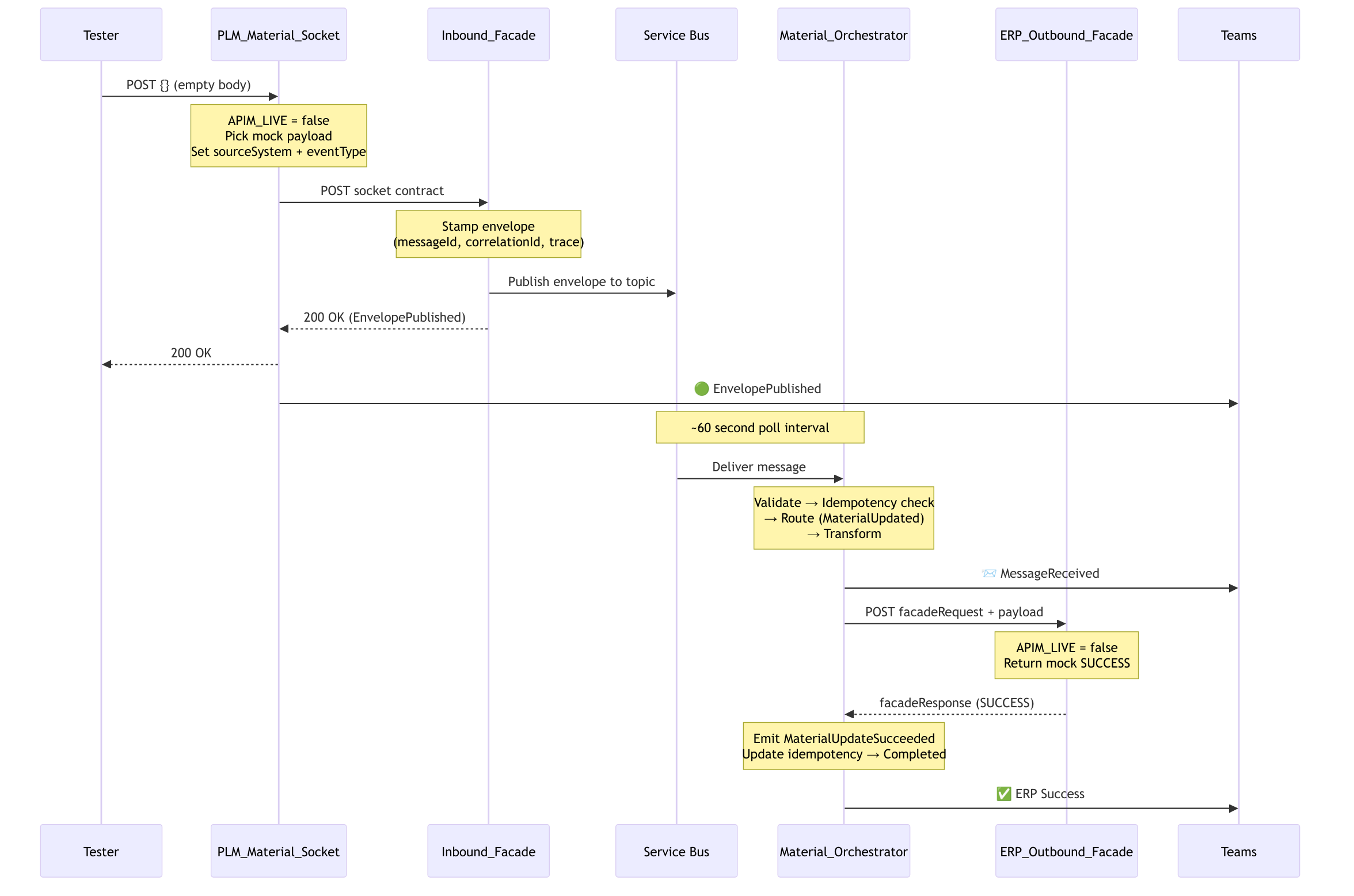
The entire chain runs. All workflows fire. All observability works. No PLM platform. No ERP system. No API gateway.
To test a different source, POST {} to the vendor material socket. Same chain, different sourceSystem in the envelope. The orchestrator doesn’t know the difference. That’s the point.
I built a bash script that fires N requests at a socket with realistic material payloads (round-robin through 20 different materials), parses each response, writes a CSV, and tells you how many Teams cards to expect. It’s not sophisticated. It doesn’t need to be. The architecture is doing the work.
What I’d Tell Another Architect
-
Know the patterns by name and source. When someone pushes back on “why sockets and a facade instead of one big workflow,” you can point to Gamma (1994), Fowler (2002), and Hohpe and Woolf (2003). These aren’t opinions, they’re published, battle-tested structural decisions with thirty years of production evidence.
-
Push source-specific logic to the edge. The socket layer means the facade and everything downstream never see vendor-specific webhook formats, event naming conventions, or authentication quirks. New source? New socket. Nothing else changes.
-
Start with the envelope. Define the message contract before you build the workflows. Everything downstream depends on it. Get
schemaVersion,messageId,correlationId, andeventTyperight on day one. -
Build from the outside in. Get a socket producing the socket contract. Get the facade stamping envelopes. Get the outbound facade returning mock responses. Then build the orchestrator in between. This lets you test each boundary independently before wiring them together.
-
Use a feature toggle from day one.
APIM_LIVEcost nothing to implement and saved weeks of waiting for external systems. The entire chain was testable before a single external endpoint was connected. Put the toggle in the sockets, that’s where mock payloads originate. -
Dead-letter explicitly. Don’t let bad messages rot on the subscription. Dead-letter with a reason. Alert on it. You’ll thank yourself during production support.
-
One response action. Every HTTP-triggered workflow, socket, facade, or outbound facade, should have exactly one
Response_Finalthat runs on every code path. No orphaned callers. -
Test the contracts, not the systems. The outbound facade’s validation caught the orchestrator’s malformed payload before the ERP ever would have. The facade’s validation caught the socket’s missing content type header. That’s cheaper debugging by an order of magnitude.
-
Read the books. Hohpe and Woolf’s Enterprise Integration Patterns is from 2003 and it reads like it was written for what we’re building today on Logic Apps and Service Bus. Fowler’s PoEAA explains why your facade should be coarse-grained. Richardson explains why your orchestrator should own the saga. The technology changes. The decomposition principles don’t.
This is a living system. The Switch has one case today (MaterialUpdated). It’ll have more. The sockets will multiply as new sources come online. The facades will connect to real endpoints. The idempotency table will fill up and need a retention policy. But the bones are right, and the patterns will hold.
Start simple, test the chain, and evolve based on what actually breaks.