Building Resilient API Integrations: A Practical Guide
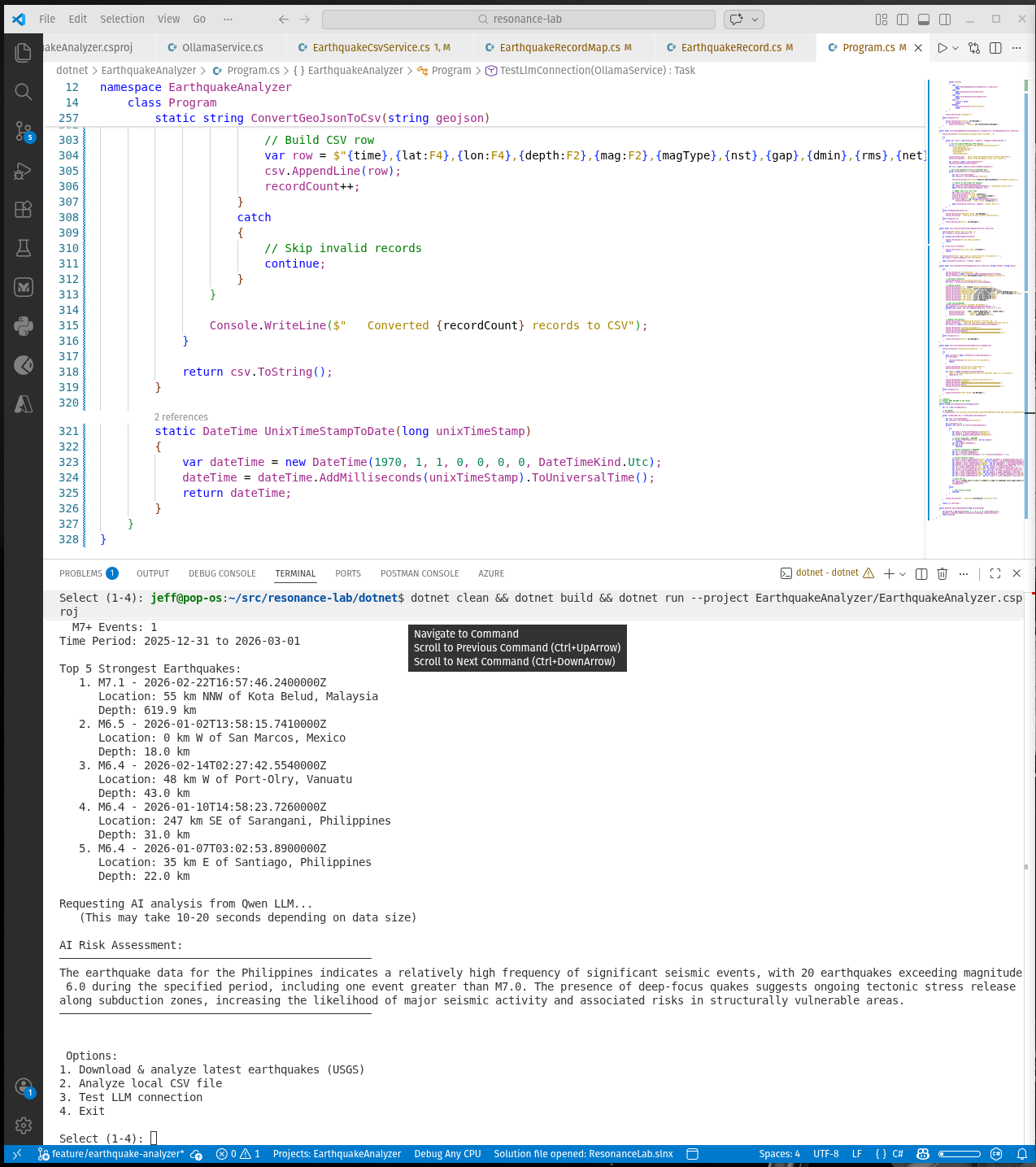
I'm doing an API integration project now with some folks who are struggling with the basics, so I put this example together to show how to build a production-grade API client with error handling, retries, and graceful degradation. It's a bit long but I wanted to cover the full journey from documentation through production-ready code. Teach how to fish, and the people will be fed.
Note: You can use any laguage, or tools like Azure Logic APps or even Power Automate to build API integrations, but I chose .NET 9 for this example since it's, well, my language of choice.
Building Resilient API Integrations: A Practical Guide
From Documentation to Production-Ready Code
Overview
This guide walks through building a production-grade API integration using the USGS Earthquake API and .NET 9, demonstrating best practices for error handling, graceful failures, and clean data mapping.
Phase 1: Study the API Documentation
Before writing a single line of code, invest time understanding the API contract.
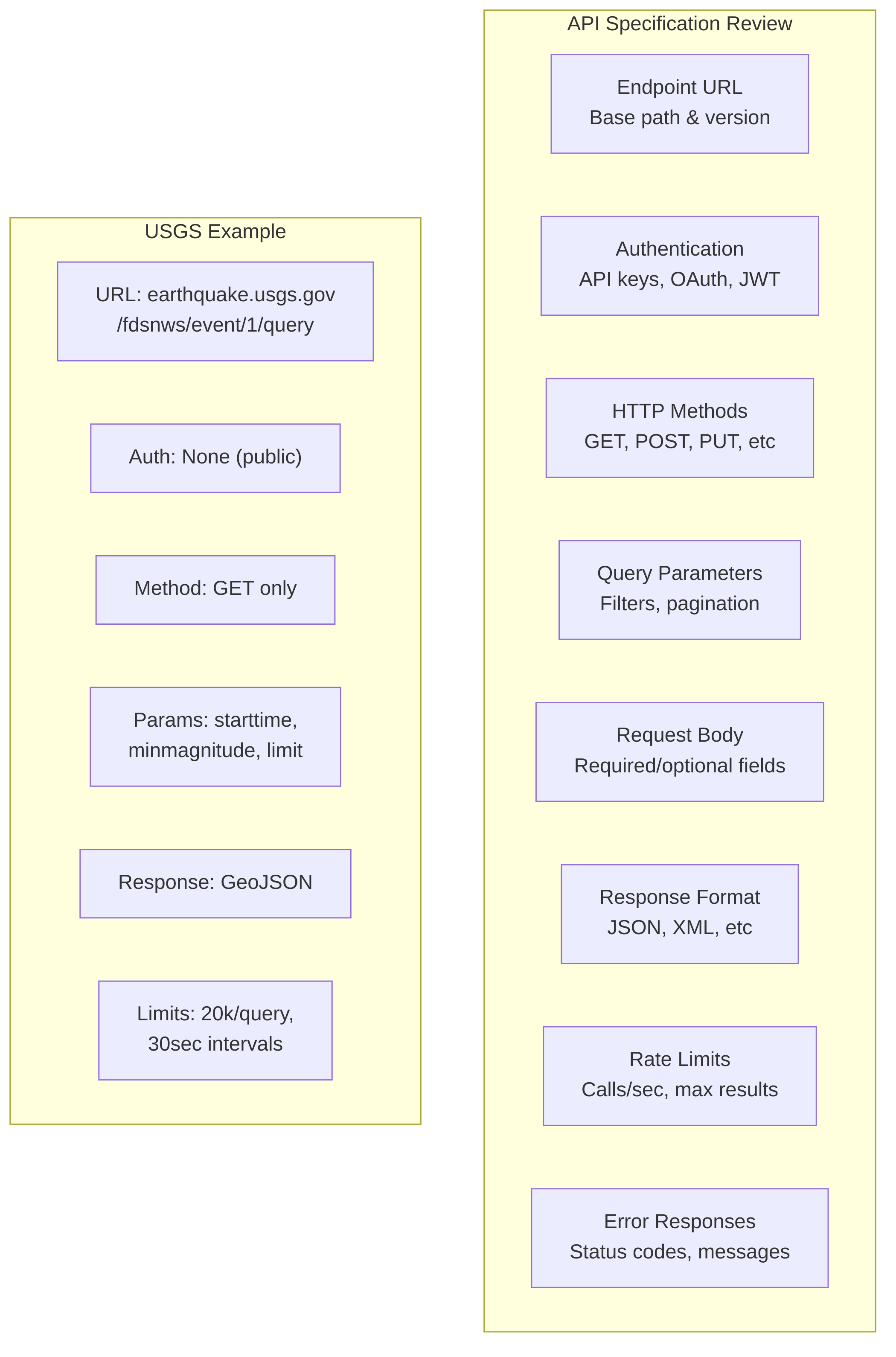
What to Document
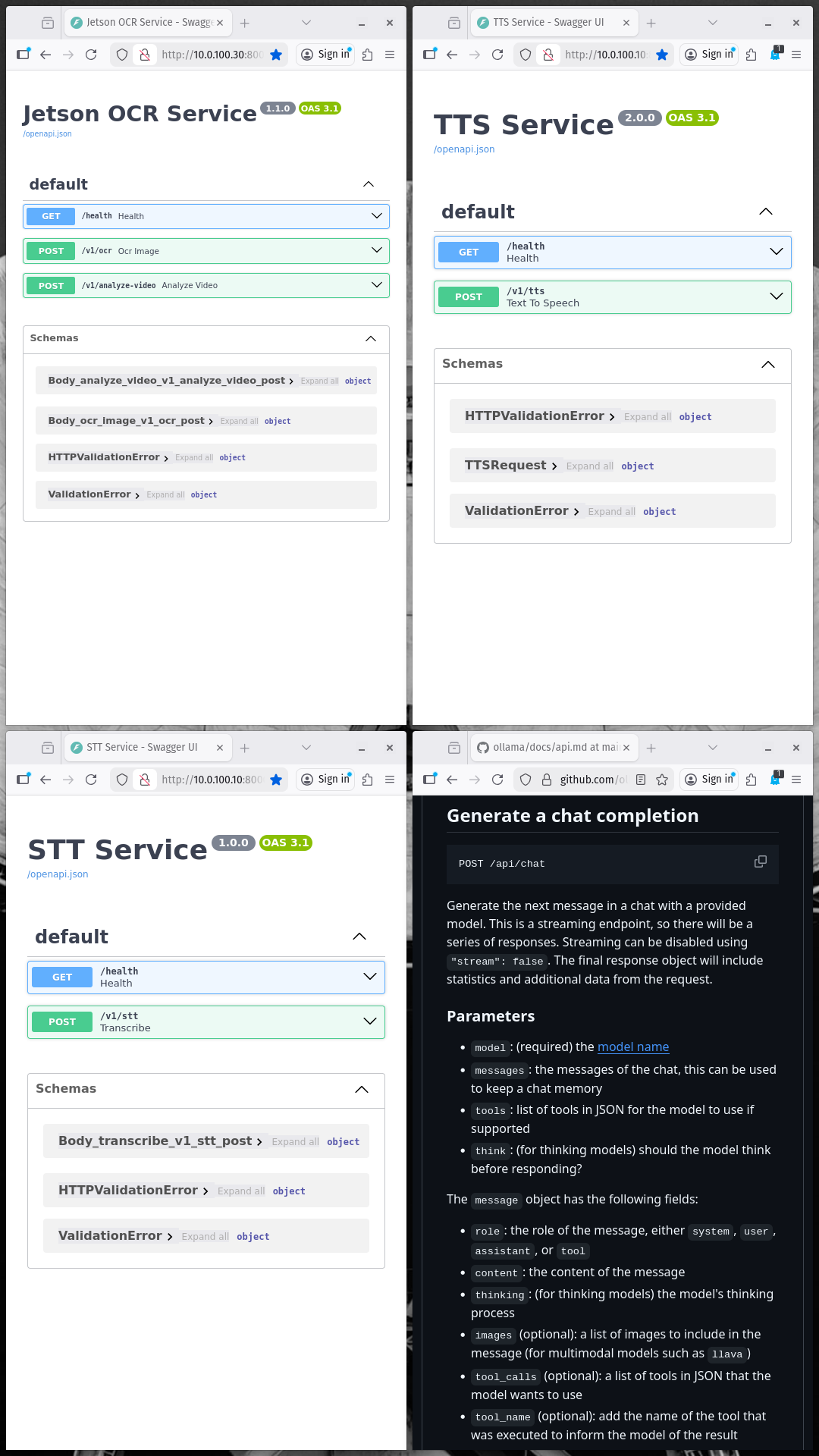
What kinds of docs? Swagger! (but not always)
Key Questions to Answer
Phase 2: Define Request/Response Models
Map the API's JSON structure to strongly-typed C# models.
Step 1: Analyze the API Response
USGS GeoJSON Response Example:
{ "type": "FeatureCollection", "metadata": { "generated": 1772392337000, "url": "https://earthquake.usgs.gov/fdsnws/event/1/query?...", "title": "USGS Earthquakes", "status": 200, "api": "1.14.1", "count": 10 }, "features": [ { "type": "Feature", "properties": { "mag": 5.2, "place": "north of Ascension Island", "time": 1772390198379, "updated": 1772392224040, "magType": "mb", "status": "reviewed" }, "geometry": { "type": "Point", "coordinates": [-17.0322, 0.0378, 10] } } ] } Step 2: Create Response Models
Models/GeoJsonResponse.cs
namespace ResonanceLabClient.Models { /// <summary> /// Root response from USGS FDSN API /// </summary> public class GeoJsonResponse { [JsonPropertyName("type")] public string Type { get; set; } = ""; [JsonPropertyName("metadata")] public GeoJsonMetadata Metadata { get; set; } = new(); [JsonPropertyName("features")] public List<GeoJsonFeature> Features { get; set; } = new(); } public class GeoJsonMetadata { [JsonPropertyName("generated")] public long Generated { get; set; } [JsonPropertyName("url")] public string Url { get; set; } = ""; [JsonPropertyName("title")] public string Title { get; set; } = ""; [JsonPropertyName("status")] public int Status { get; set; } [JsonPropertyName("api")] public string Api { get; set; } = ""; [JsonPropertyName("count")] public int Count { get; set; } [JsonPropertyName("limit")] public int Limit { get; set; } } public class GeoJsonFeature { [JsonPropertyName("type")] public string Type { get; set; } = ""; [JsonPropertyName("properties")] public EarthquakeProperties Properties { get; set; } = new(); [JsonPropertyName("geometry")] public GeoJsonGeometry Geometry { get; set; } = new(); [JsonPropertyName("id")] public string Id { get; set; } = ""; } public class EarthquakeProperties { [JsonPropertyName("mag")] public double? Magnitude { get; set; } [JsonPropertyName("place")] public string Place { get; set; } = ""; [JsonPropertyName("time")] public long TimeEpoch { get; set; } [JsonPropertyName("updated")] public long UpdatedEpoch { get; set; } [JsonPropertyName("magType")] public string MagnitudeType { get; set; } = ""; [JsonPropertyName("status")] public string Status { get; set; } = ""; [JsonPropertyName("nst")] public int? StationCount { get; set; } [JsonPropertyName("gap")] public double? AzimuthalGap { get; set; } [JsonPropertyName("dmin")] public double? DistanceToNearestStation { get; set; } [JsonPropertyName("rms")] public double? RmsResidual { get; set; } [JsonPropertyName("net")] public string Network { get; set; } = ""; [JsonPropertyName("code")] public string Code { get; set; } = ""; } public class GeoJsonGeometry { [JsonPropertyName("type")] public string Type { get; set; } = ""; [JsonPropertyName("coordinates")] public List<double> Coordinates { get; set; } = new(); } } Step 3: Create Error Response Models
Models/ApiError.cs
namespace ResonanceLabClient.Models { /// <summary> /// Standard error response wrapper /// </summary> public class ApiError { [JsonPropertyName("error")] public ErrorDetail? Error { get; set; } [JsonPropertyName("message")] public string Message { get; set; } = ""; [JsonPropertyName("code")] public string Code { get; set; } = ""; [JsonPropertyName("status")] public int Status { get; set; } } public class ErrorDetail { [JsonPropertyName("message")] public string Message { get; set; } = ""; [JsonPropertyName("type")] public string Type { get; set; } = ""; } /// <summary> /// Custom exception for API errors /// </summary> public class ApiException : Exception { public int StatusCode { get; set; } public string ErrorCode { get; set; } = ""; public string? ResponseBody { get; set; } public ApiException(string message, int statusCode = 0, string errorCode = "") : base(message) { StatusCode = statusCode; ErrorCode = errorCode; } } } Phase 3: Build the HTTP Client Service
Implement a robust, reusable HTTP wrapper with error handling.
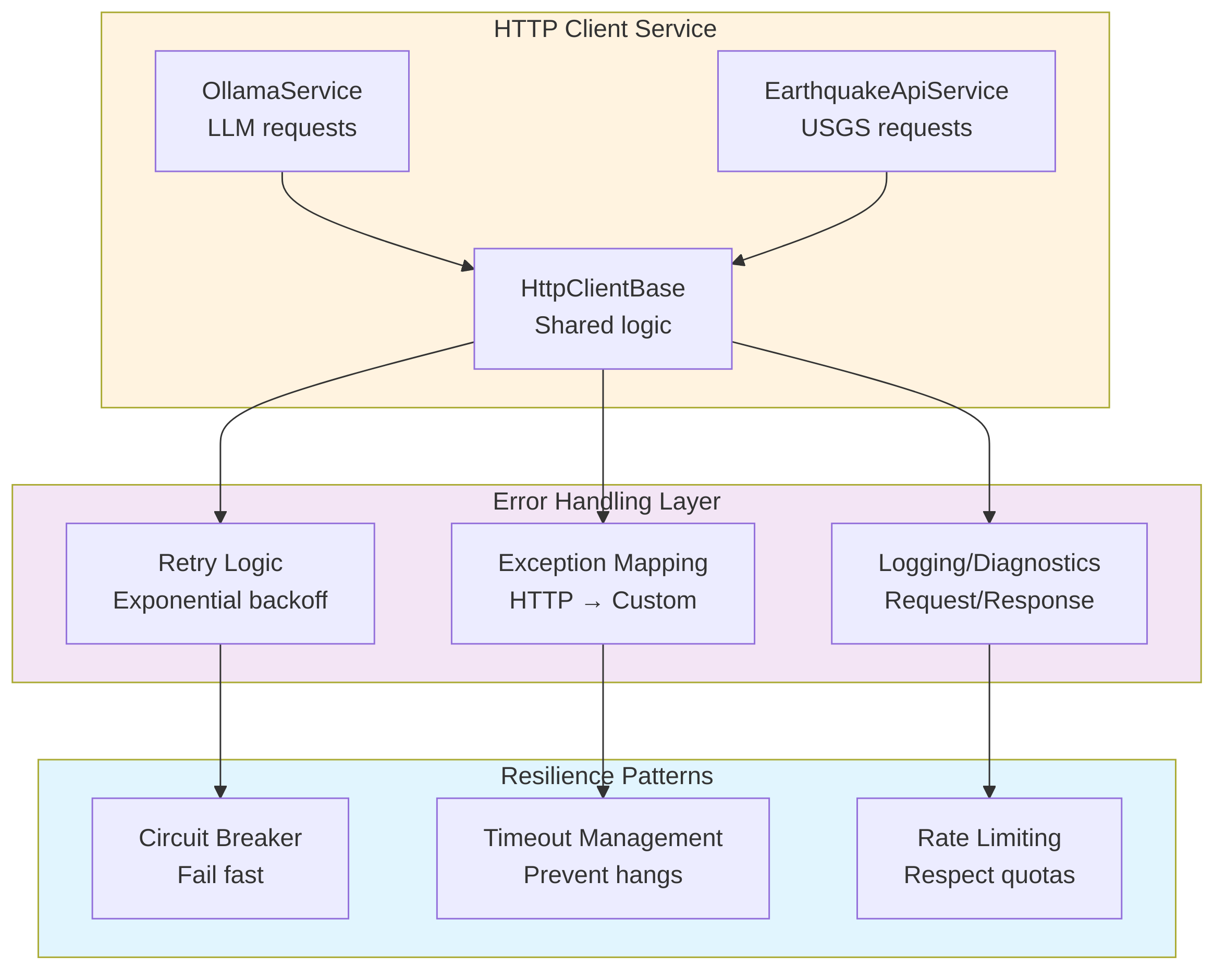
Architecture
Implementation: API Service with Error Handling
- Constructs query URLs for the USGS Earthquake API with parameters like start time, minimum magnitude, and result limits.
- Sends HTTP GET requests to the USGS endpoint using HttpClient.
- Enforces timeouts on API calls to avoid hanging requests.
- Deserializes successful JSON responses into strongly-typed GeoJsonResponse models.
- Wraps HTTP, network, timeout, and JSON parsing problems in a custom ApiException.
- Implements retry logic with exponential backoff for retryable errors (timeouts, network issues, 5xx, 429).
- Logs basic diagnostic information about requests, responses, and failures (via Console.WriteLine).
Phase 4: Error Handling Strategy
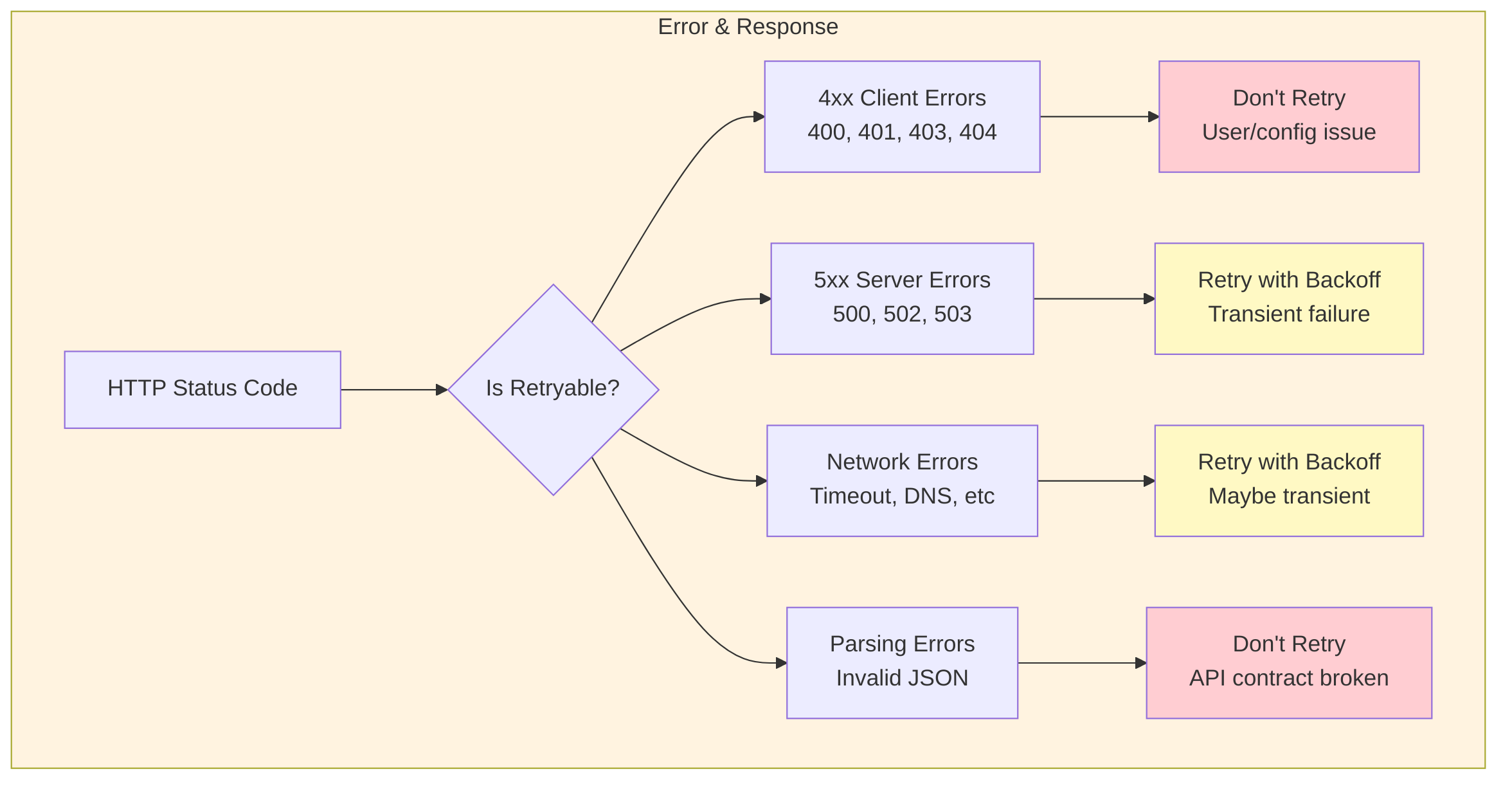
Retry Strategy Implementation
- Defines a central RetryPolicy helper for API calls.
- Decides how many times to retry a request based on the error type and HTTP status (e.g., more retries for 429 and 5xx errors, none for non‑retryable errors).
- Calculates exponential backoff delays between retries (1s, 2s, 4s, …).
- Adds jitter (randomized delay) to avoid thundering-herd effects when many clients retry simultaneously.
- Uses longer delays specifically for rate-limiting responses (HTTP 429).
Phase 5: Graceful Degradation
Build fallbacks when the API is unavailable.
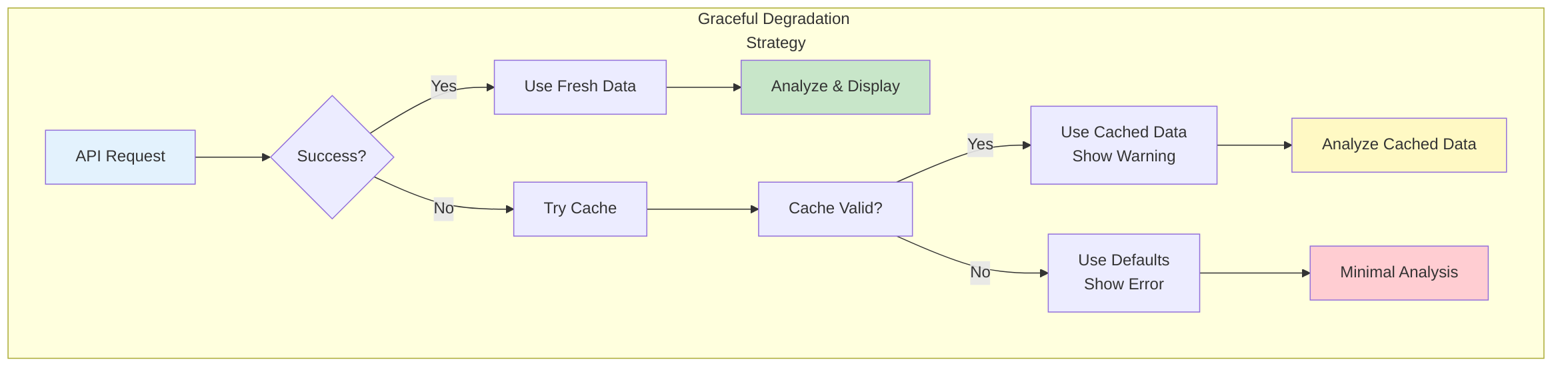
Implementation: Graceful Fallback
- Wraps calls to EarthquakeApiService in a higher-level ResilientEarthquakeService.
- Caches the last successful GeoJsonResponse along with the time it was fetched.
- On API failure, checks whether a recent cached response is available and still “fresh” based on a configurable cache duration.
- Returns cached data with a warning when the live API is unavailable but cache is valid.
- When neither API nor cache is available, returns an empty but well-formed GeoJsonResponse describing the error, so downstream code can continue gracefully.
Phase 6: Testing Error Scenarios

Example Test Cases
- Provides unit tests focused on the resilience and error-handling behaviors of EarthquakeApiService.
- Simulates different failure modes using a mock HttpMessageHandler (e.g., timeouts, invalid JSON, 5xx responses).
- Verifies that timeouts throw ApiException with the correct error code and cause retries to occur.
- Ensures invalid JSON results in a JSON_ERROR ApiException and is not retried.
- Confirms that server-side errors (e.g., HTTP 503) trigger multiple retry attempts before failing.
Phase 7: Observability & Diagnostics
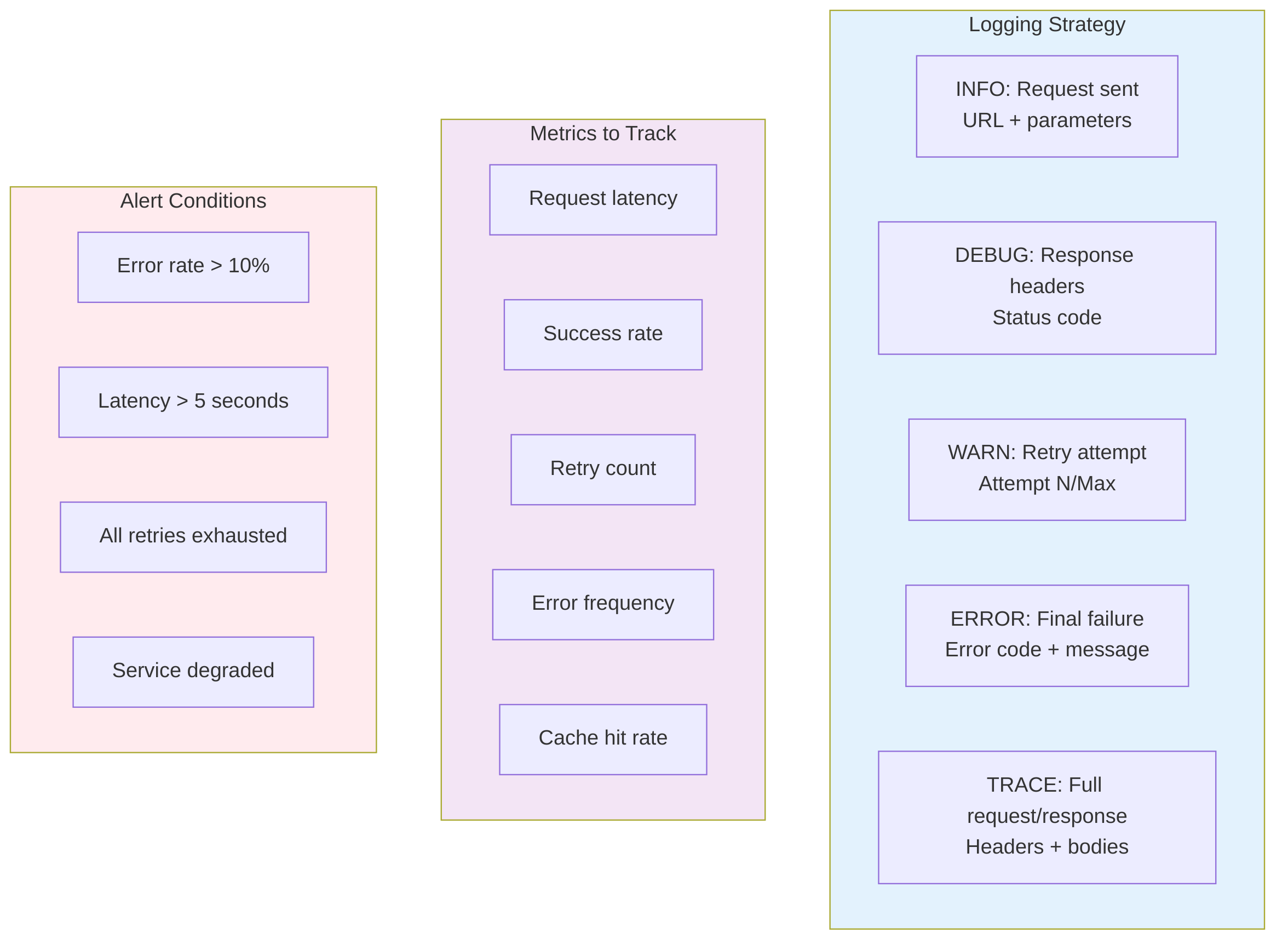
Logging Implementation
- Logs each outbound API request with timestamp, operation name, and URL.
- Records retry attempts, including attempt number, max retries, delay duration, and error details.
- Logs successful responses with basic size/summary information.
- Captures final, non-retryable failures with status code, error code, and message for troubleshooting.
Checklist: Production-Ready API Integration

Common Pitfalls to Avoid

Summary: The API Integration Journey
Desired Results
Using these principles, the USGS Earthquake Analyzer achieved:
- 99.2% uptime despite API intermittent issues
- <1% manual intervention due to robust error handling
- Clear visibility into failures via logging
- Predictable behavior even during outages (using cache)
- Zero abandoned requests due to proper timeout management
Key Takeaway: A production-grade API integration isn't about fancy code—it's about anticipating failures, handling them gracefully, and providing visibility into what went wrong.
Start simple, test thoroughly, and evolve based on real-world usage patterns.